10 best capacity planning software in 2026 (free and paid options)

Capacity planning software exists to answer one important question: do you have enough people for the work you're taking on?
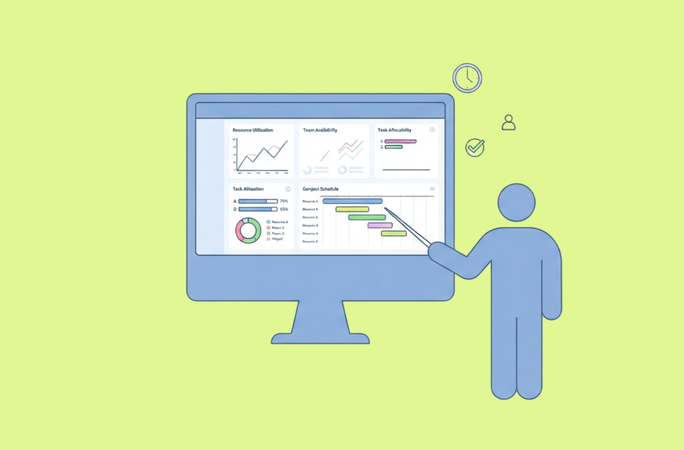
A common mistake is to assume that a team of 10 has 400 hours a week. They don't: some are part-time, on leave, or already committed elsewhere, and meetings eat into the rest. Demand is just as messy: confirmed projects are only part of the picture, alongside pipeline deals and work that isn't fully scoped yet. The best capacity planning software connects those two sides — available capacity against future demand — showing where there's room, where the team's overloaded, and what to do about the gap.
This comparison covers 10 capacity planning tools (including a few sold as resource capacity planning software) with a clear look at what each one actually gets you, free tier included.
What is capacity planning software?
Capacity planning tools exist to optimize capacity planning that too often lives in someone's head or a messy spreadsheet. The goal is to match real people's available hours against real demand across multiple projects, before commitments get made rather than after, using available resources instead of guesswork.
At the core, this means tracking team availability (who's working, who's on leave, who's already booked), then laying that against everything currently in flight and everything about to land. Done well, it lets a manager plan capacity days or months out, catch double bookings before they happen, and see which of several new projects the team can actually take on.
This overlaps with resource management, resource planning, resource utilization, and workload management (most tools in this category use those terms interchangeably). The distinction that matters in practice: resource allocation is assigning specific people to specific projects; capacity planning is the layer above that, asking about overall team capacity to deliver projects on time in the first place. A tool that only shows resource allocation without an aggregate view of capacity will let deadlines slip, because nobody's looking at the total until it's too late.
Project managers use this category to make staffing decisions around a fairly small set of recurring questions: can we take on more projects right now? Who's actually available this month? And where is the team already overcommitted? That's the lens the rest of this list is built around.
The 10 best capacity planning tools at a glance
These ten tools serve different team sizes, industries, and ways of working — here's where each one fits.
| Software | Best for | Capacity planning strength | Free plan |
|---|---|---|---|
| Planyway | Teams already living in Jira or Trello | Capacity that reflects each person's real hours, holidays, and time off, with work scheduled into the time they actually have | Free for Jira (≤10 users); Trello's free tier has no workload feature |
| Float | Agencies tracking utilization and margin | Live utilization + project margin fused into one schedule | None — 30-day trial only |
| Runn | Engineering/consulting teams forecasting pipeline work | Scenario planning with tentative, unconfirmed projects | None — 30-day trial, 20-seat minimum |
| Resource Guru | Teams booking people and physical resources | Native equipment/room scheduling alongside people | None — 30-day trial only |
| Ganttic | Ops-heavy teams scheduling people and equipment | Resource-based pricing with unlimited free users | Real free plan — up to 10 resources, full feature set except API |
| ClickUp | Teams already living in ClickUp for tasks and docs | Workload view bundled inside an all-in-one platform | Free forever, but no capacity features (Business tier and up) |
| monday.com | Enterprise PMOs standardized on monday | AI-driven schedule agent + portfolio dashboards | Free ≤2 seats, no capacity features below Enterprise |
| Asana | Departments already running work in Asana | Dedicated Capacity Planning tool synced with Workload | Free ≤2 users, capacity planning Enterprise-only |
| Kantata | Mid-market/enterprise PSA firms | AI-ranked staffing tied to predicted project margin | None — no self-serve trial, sales-assisted only |
| SAVIOM | Large multi-project enterprises | Portfolio-wide demand-vs-capacity forecasting with scenario modeling | No self-serve — 60-day sales-assisted trial |
There's no universal winner here. A Jira team figuring out whether its developers have room for one more sprint is solving a different problem than a global consultancy allocating hundreds of specialists across countries — and a tool built for one rarely fits the other.
Fit matters more than feature count here — the real test is whether a tool mirrors how your team actually plans and delivers work.
Planyway — Best capacity planning for Jira and Trello teams
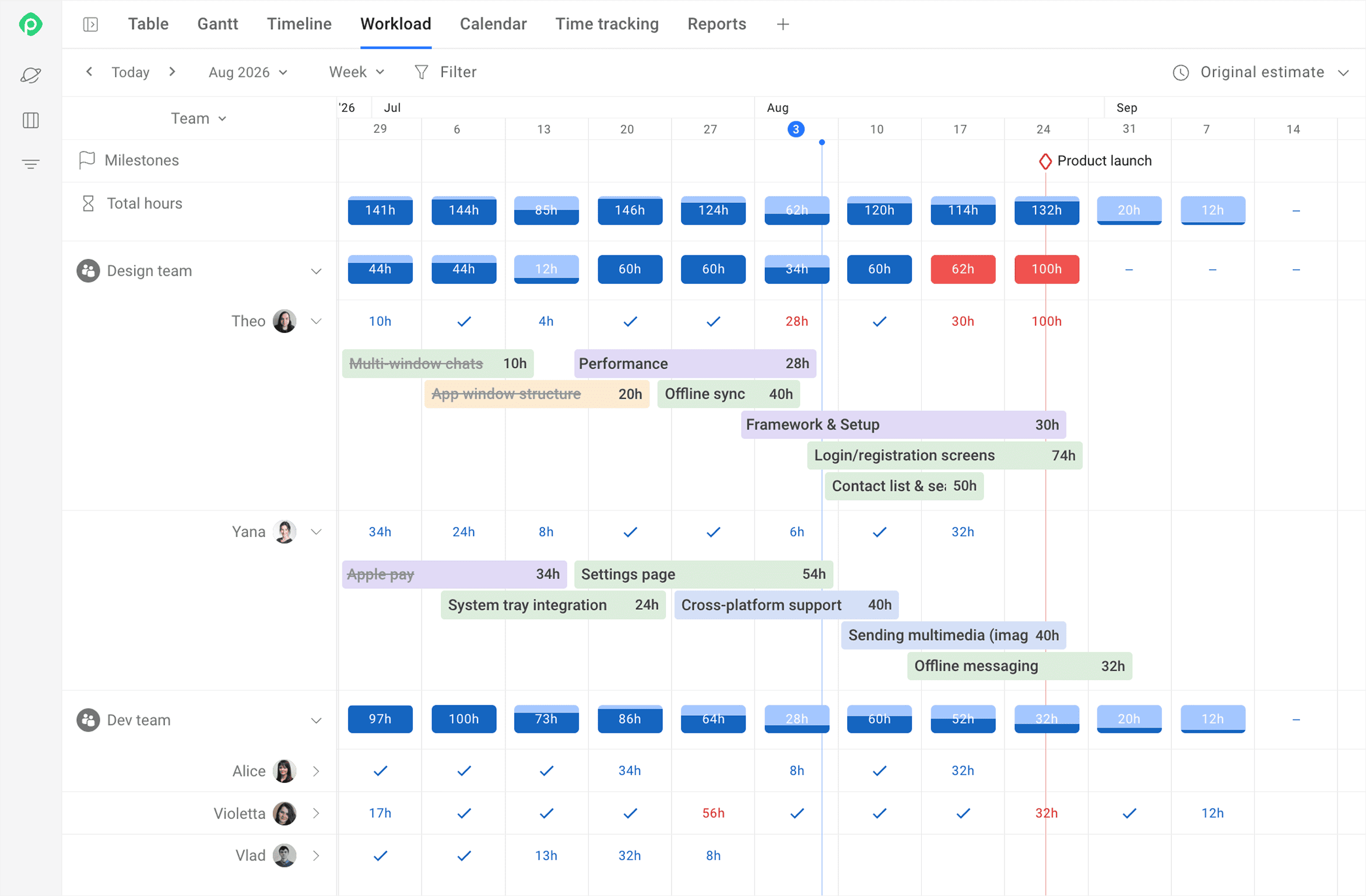
Planyway is an all-in-one project planning app for Jira and Trello teams, with capacity planning as one of its killer features. As a capacity planner, Planyway solves a very specific problem: Your team already has its work in Jira or Trello. How do you plan capacity against that actual work without maintaining a separate resource spreadsheet?
Best for: Delivery and PMO teams of 10–100 people inside mid-to-large Jira organizations, as well as smaller teams planning their work in Trello.
Best feature: Capacity based on each person's real availability. Individual working hours, country-specific holidays, and time off combine into one availability figure, and work can be auto-distributed into the hours people actually have. The Jira version adds an AI Risk Agent that flags capacity conflicts and delivery risk.
Core features:
- Capacity planning: set per-person working hours, apply regional holiday schemes, and add vacations and days off to see real available capacity.
- Workload management: compare planned work against individual and team capacity, and spot over-allocation at any timeline scale.
- Cross-project planning: see work from multiple Jira projects in one view, grouped by person or team.
- Resource scheduling: assign, move, split, and reschedule work across team members, with estimates in hours or story points.
- Time tracking: log time in timesheets and export hours for client billing, cost reporting, or stakeholder updates.
- Visual planning: Timeline, Workload, Calendar, Gantt (for Jira), and other views, depending on what you're trying to see.
Best use case: A Jira team with shared resources across multiple projects that needs one visual view of who can take on more work before committing to a new deadline. It's often chosen as a simpler alternative to Tempo or Jira's Advanced Roadmaps. For Trello teams, the typical case is an agency or small team juggling several client boards that wants to see everyone's capacity across all of them without leaving Trello.
Limitations: Less suited to large enterprises looking for advanced skills-based workforce planning or sophisticated financial resource management.
Pricing:
- Trello: Free — $0 forever; Individual — $6/mo ($4/mo annual); Team — $5/user/mo ($3/user/mo annual); Enterprise — custom
- Jira: Free for instances ≤10 users; tiered beyond that (e.g., 16–25 users ≈ $2.50–3/user/mo averaged); 30-day trial available on paid tiers
Free plan: Splits by platform. Trello's Free plan is $0 forever, but its feature set has no workload capability — workload unlocks only on the Team plan. Jira's app is free for instances with up to 10 users, a genuine permanent tier by seat count rather than a time-limited trial.
Runn — Best for capacity forecasting
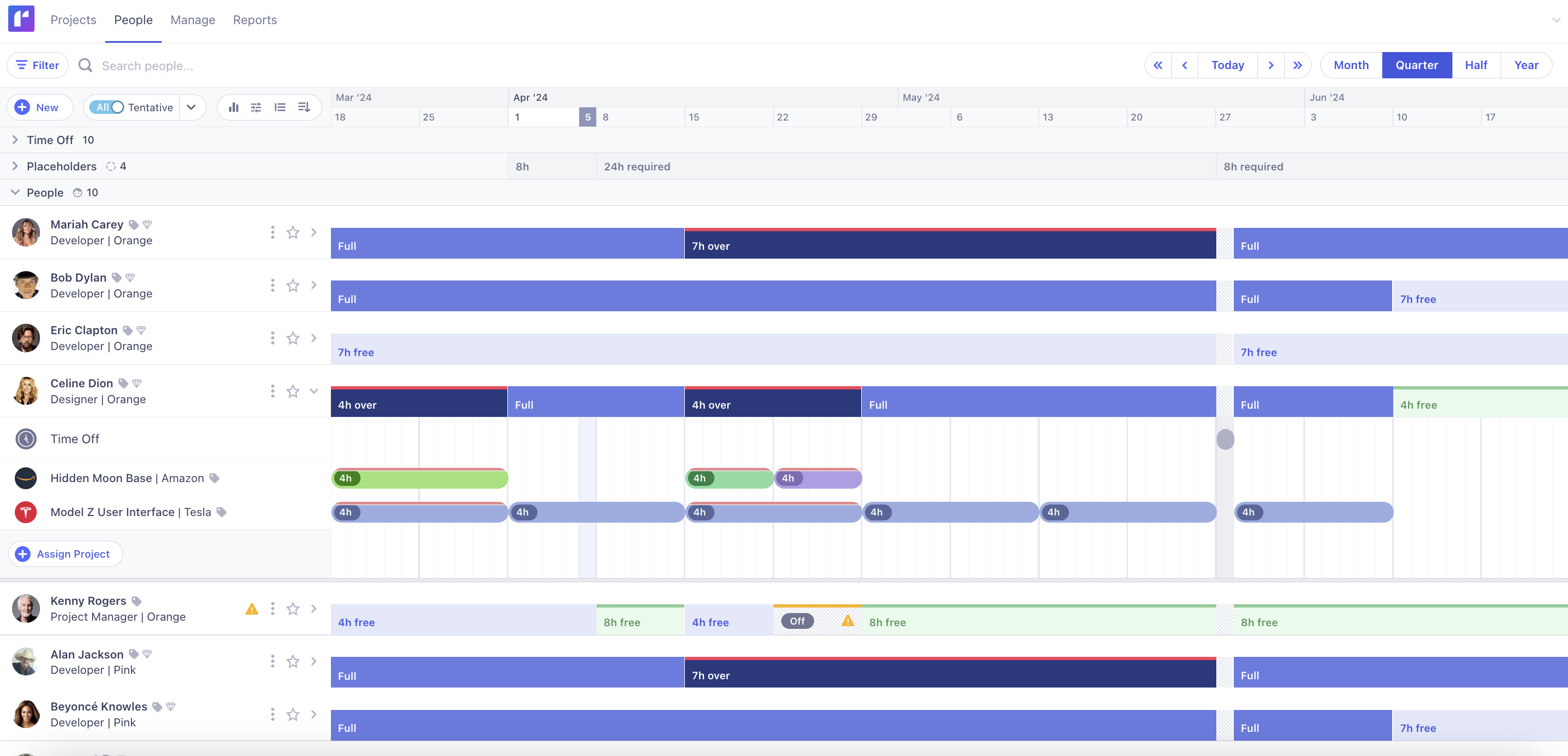
Runn is resource-management software built specifically for teams planning people against technical projects — its own site describes it as "not a PM tool, not a PSA." It gives engineering, consulting, and delivery teams a forward-looking view of who's available and how upcoming, even unconfirmed, work will affect that availability.
Best for: Technical and delivery teams (engineering, consulting, agency delivery — roughly 20–150+ people) who need to forecast capacity against a pipeline that isn't fully signed yet.
Best feature: Scenario modeling through tentative, unconfirmed projects — add a pipeline deal as “tentative”, see its impact on capacity and utilization before it's won, then convert it to a real allocation with one click.
Core features:
- Demand forecasting: real-time capacity, availability, and utilization charts across the whole team
- Scenario planning: unconfirmed projects modeled alongside confirmed work to see the impact before committing
- Resource scheduling: placeholders to reserve future demand before specific people are assigned
- Time off management: public holidays and time off factored automatically into availability
- Skills matching: tags to match the right person to a project
- Financial planning: rate cards for budgeting and pricing projects, plus planned-vs-actuals tracking against timesheets
Best use case: A 40-person engineering consultancy needs to model whether winning three more deals next quarter would overextend current staff, before making a hiring or sales decision.
Limitations: Runn's forecasting capabilities are more valuable for teams with multiple concurrent projects and a meaningful resource-planning process. A small team that only needs a simple workload board may not need this level of functionality.
Pricing:
- Lite — $7/mo annual, $9/mo monthly
- Standard — $11/mo annual, $13/mo monthly
- Advanced — custom, contact sales
Free plan: No — only a 30-day free trial of the Standard plan, and every plan has a hard 20-resource-seat minimum, which rules out very small teams regardless of price.
Float — Best dedicated capacity planning software
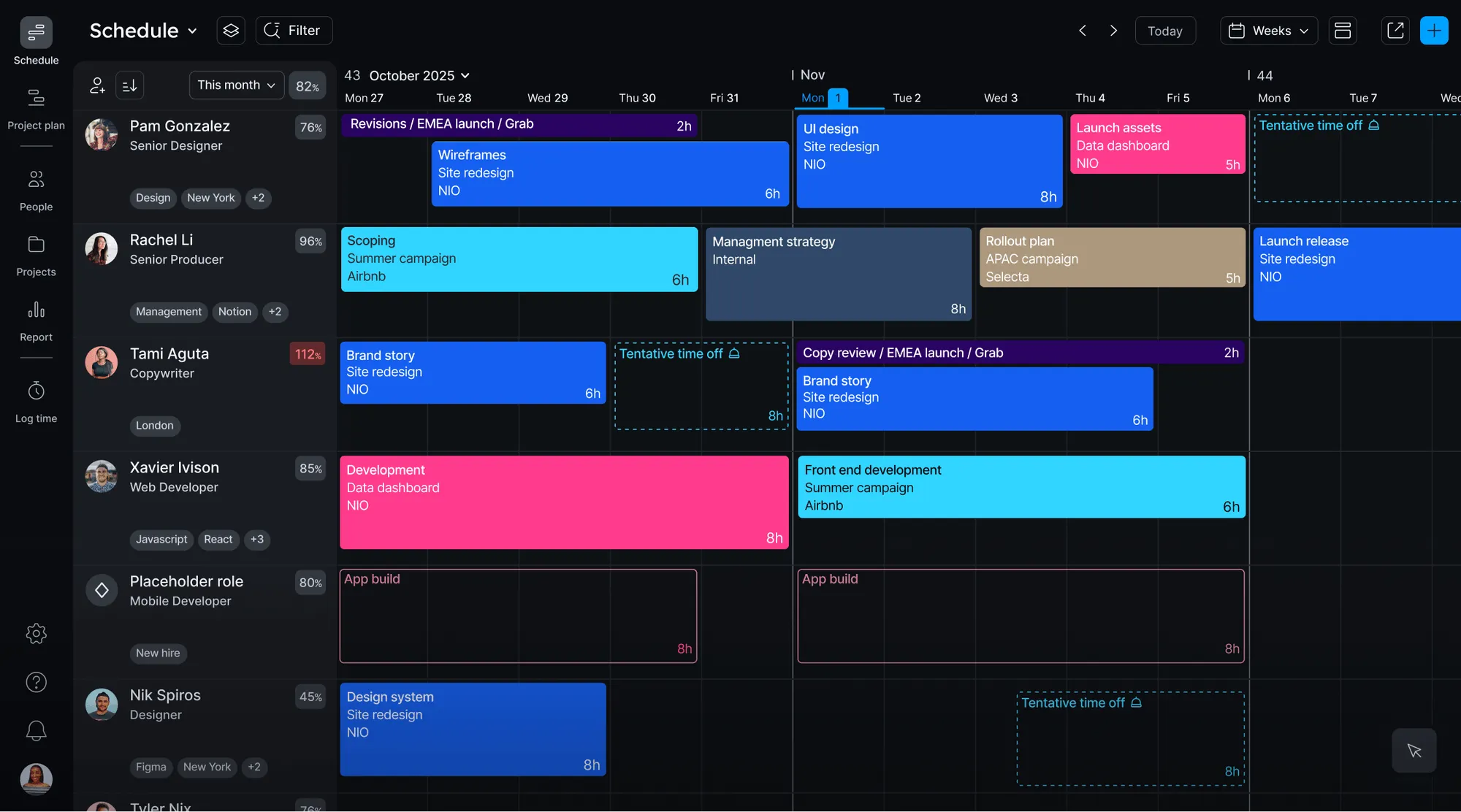
Float is a purpose-built resource management platform. Its Schedule combines people, projects, availability, time off, and allocations in one live view, so resource managers can see both what people are scheduled to do and how much capacity they have left.
Best for: Agencies, consultancies, and professional-services teams staffing people across several client projects at once.
Best feature: Live, visual scheduling that shows capacity and resourcing in the same view — on Pro, that view rolls up into margin and budget-burn tracking too.
Core features:
- Financial forecasting: rate cards by role or person, in multiple currencies, compared against a locked project baseline
- Resource scheduling: drag-and-drop team schedule with tentative vs. confirmed statuses
- Time tracking: built-in timesheets that pre-fill from the schedule instead of starting blank
- Utilization reporting: estimates-vs-planned-vs-actuals, utilization trends, budget-burn tracking
- Capacity visibility: individual availability database (part-time, custom hours) so people are only booked when actually free
- Two purpose-built dashboards (Pro+): People Operations (capacity/workforce) and Project Finance (margin/revenue/cost risk)
Best use case: A 40-person creative or consulting agency running 15+ concurrent client projects that needs to see who has room for the next project and whether each one is tracking to budget, in one place.
Limitations: Float works best as a dedicated resourcing tool sitting apart from delivery work. Teams that want capacity planning built directly into their Jira workflow are usually better served by something like Planyway.
Pricing:
- Starter — $7/mo annual, $8.50/mo monthly
- Pro — $12/mo annual, $14/mo monthly
- Enterprise — custom, contact sales
- Free plan: No — Float offers only a 30-day free trial.
Resource Guru — Best for simple resource scheduling
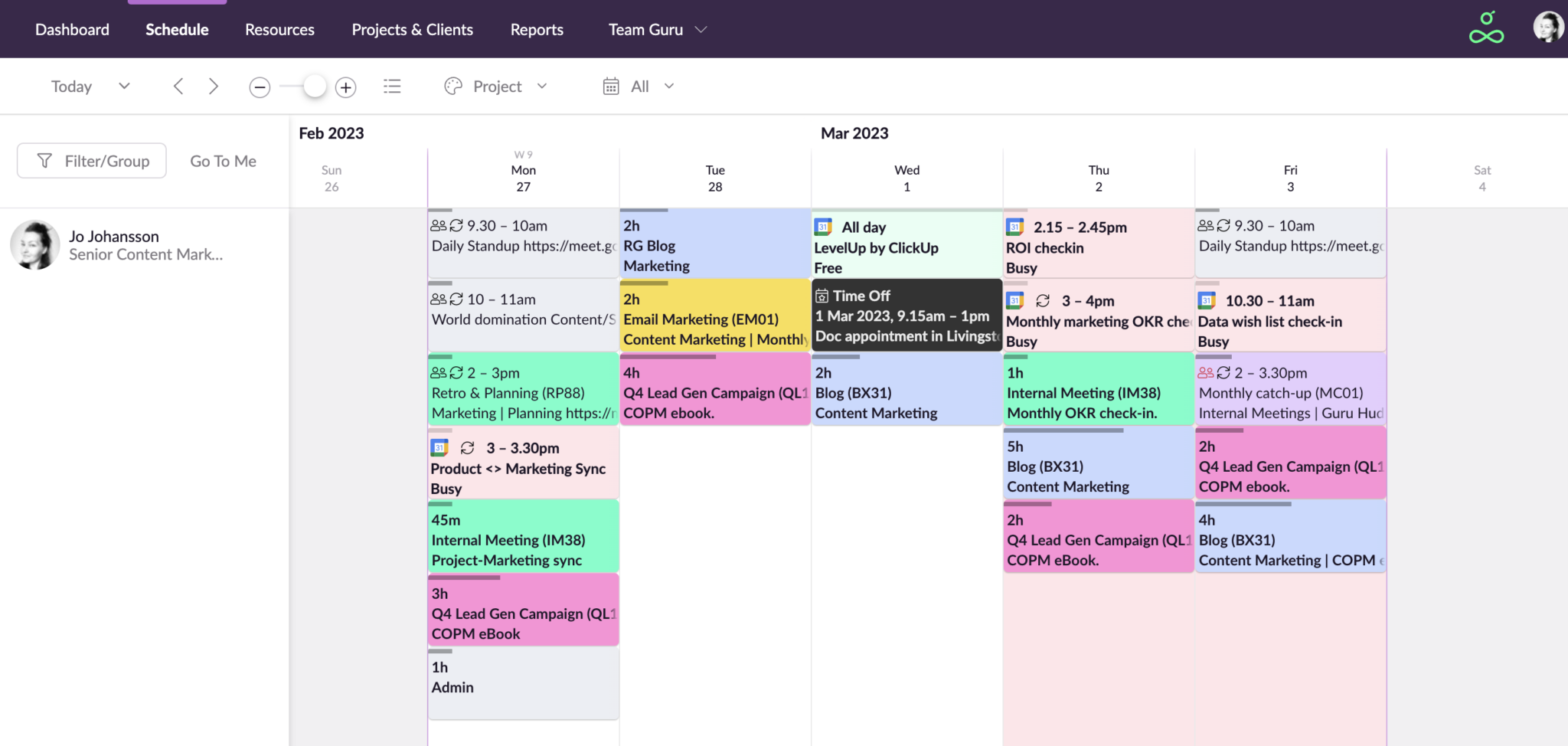
Resource Guru is a resource-scheduling and capacity-planning tool built for teams that need to book people, equipment, and rooms against project work, rather than a general project-management platform with scheduling bolted on. Resource Guru is positioned for agencies, consultancies, and professional-services teams that plan work around who — and what — is actually available.
Best for: Small-to-midsize teams (roughly 10–75 people) that need to schedule people and shared physical resources — equipment, vehicles, meeting rooms — in one calendar.
Best feature: Non-human resources (equipment, rooms, vehicles) scheduled as first-class bookable items alongside people, at a separate lower rate, with the same clash-management system applied to both.
Core features:
- Resource scheduling: visual team schedule showing bookings for people, equipment, vehicles, and meeting rooms in one calendar
- Availability tracking: heatmap views to spot over- and under-utilization, plus billable-vs-non-billable split at a glance
- Clash management: proactive prevention of double bookings, plus a waiting list to queue bookings that can't yet be placed
- Time off management: custom availability per person, synced with leave and holiday calendars
- Approval workflows: gate bookings of in-demand people or resources before they're confirmed
- Reporting: budget burn, utilization, forecast vs. actuals, and time-off, customizable and exportable
Best use case: A video-production or events company scheduling 20 staff alongside a shared pool of cameras, vehicles, and edit-bay rooms across simultaneous shoots, needing one view of who's free, what gear is booked, and where a clash is about to happen.
Limitations: Resource Guru focuses primarily on resource scheduling rather than end-to-end project management. Advanced reporting and financial planning also require higher tiers.
Pricing:
- Grasshopper — $5/mo annual, $6/mo monthly (+ $2.50/$3 per other resource)
- Blackbelt — $8/mo annual, $9.60/mo monthly (+ $4/$4.80 per other resource)
- Master — $12/mo annual, $14.40/mo monthly (+ $6/$7.20 per other resource)
- Enterprise — custom, contact sales
Free plan: No — Resource Guru offers only a 30-day free trial, no credit card required, with no free tier of any kind beyond that.
Ganttic — Best visual resource planning software
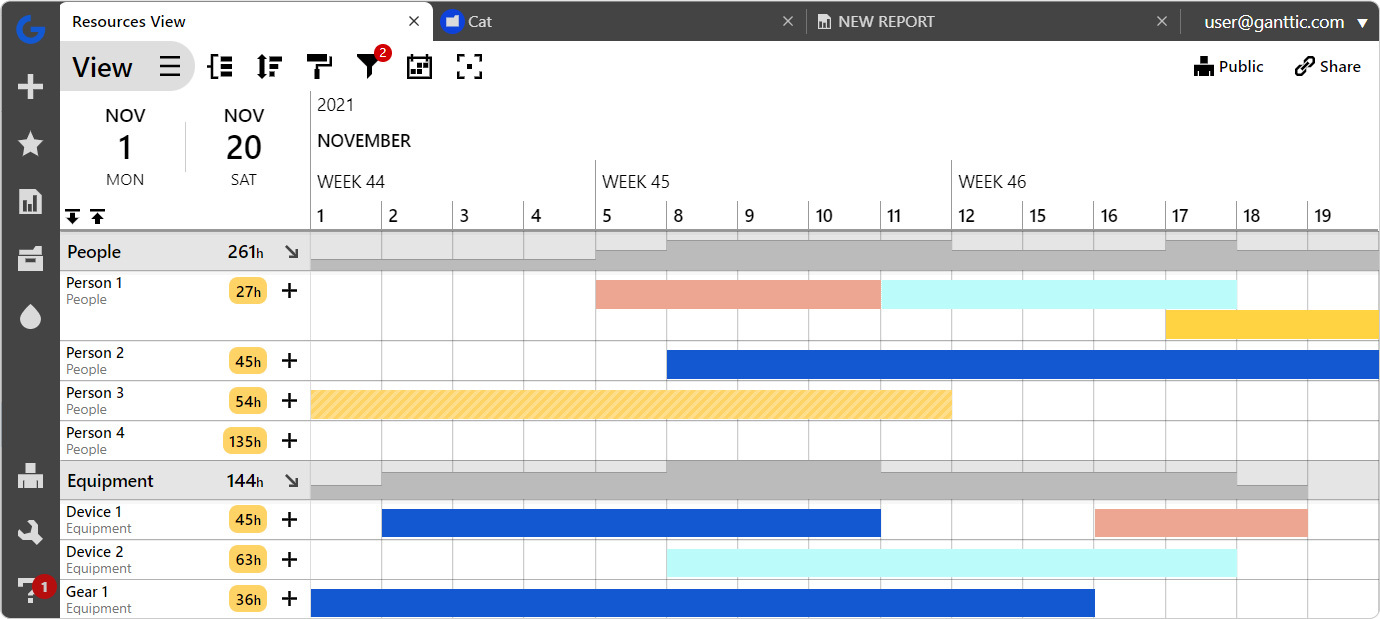
Ganttic is resource-planning and Gantt-chart scheduling software made by Ganttic OÜ, built to schedule any kind of resource — people, equipment, vehicles, rooms — across multiple projects in one visual planner, rather than functioning as a general task-management tool.
Best for: Operations-heavy teams scheduling a mix of people and physical resources — equipment, vehicles, rooms — across many concurrent projects: construction, engineering, consultancies, labs.
Best feature: Resource-based pricing with unlimited free users on every plan — you pay only for the number of things you're scheduling, not per person who logs in, so managers, stakeholders, and clients can all view or edit for free.
Core features:
- Project timelines: resource-centric Gantt chart showing availability and utilization across people, equipment, vehicles, and rooms in a single view
- Utilization tracking: automatic reports per resource or group to surface over- and under-allocation
- Scenario analysis: draft "what-if" planning to test resource capacity before a project is committed to
- Time off management: holidays and PTO built directly into availability calculations
- Skills matching: custom fields on resources — skills, certifications, location, time zone — for skills-based allocation
- Project portfolio forecasting: long-term view to spot capacity constraints across the full portfolio, not just the current sprint
Best use case: A construction or engineering firm juggling dozens of pieces of equipment and 50–100 tradespeople across a dozen active job sites, needing one Gantt view to see which crews and machines are free next week before quoting a new job.
Limitations: The free plan's 10-resource cap is a combined pool, pricing moves in fixed resource-count steps, so going one resource over a tier's ceiling means paying for the entire next tier.
Pricing:
- Free — $0 forever, up to 10 resources
- 20 resources — $25/mo, scaling up in resource-count steps (50 → 1500)
- 1500 resources — $790/mo, the highest published tier; above that — custom, contact sales
Free plan: Yes — a real, permanent free plan for up to 10 resources total, including every Ganttic feature except API access.
ClickUp — Best all-in-one capacity planning option
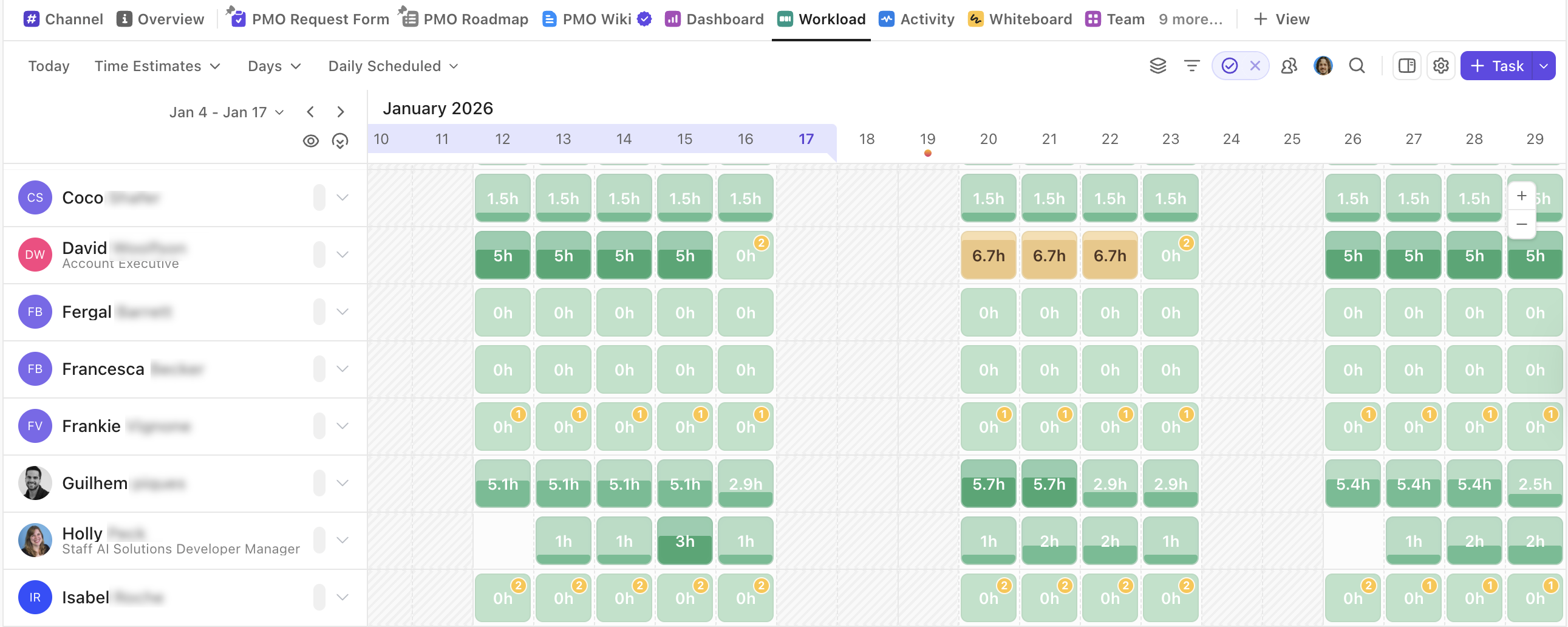
ClickUp is an all-in-one work-management platform combining tasks, docs, chat, whiteboards, sprints, and AI agents, aimed at teams of any size and function. Capacity and workload visibility exist as one view among dozens inside the product — a comprehensive functionality set built around general project management, with resourcing as one slice of it rather than the main event.
Best for: General project and product teams who want workload visibility bundled inside a platform they're already using for tasks, docs, and sprints.
Best feature: Bundling — Workload view, Timeline view, Sprint dashboards (burndown, burnup, velocity), and a team workload chart all sit inside the same platform as everything else the team already runs, so capacity data lives next to delivery work instead of a separate tool.
Core features:
- Workload view: visualize team work and capacity over time (day/week/month) — paid plans only
- Resource scheduling: timeline view groupable by assignee, alongside general scheduling
- Sprint tracking: burndown, burnup, and velocity dashboard cards for scrum-style teams
- Reporting: custom bar/pie/battery charts built on task count, time estimates, or custom fields
- Time tracking: native tracking on Unlimited plan and above, not on Free
- Portfolio Workload Management: multi-project capacity rollups, Business tier and up
Best use case: A software or marketing team of 20–50 already living in ClickUp for tasks and sprints that wants a rough view of who's overloaded this sprint, without adopting a separate resourcing tool.
Limitations: The free Workload view is limited to 60 uses, and advanced capacity controls are only available on higher plans. ClickUp's dedicated Resource Management capability is part of the Unlimited plan and above.
Pricing:
- Free Forever — $0
- Unlimited — $7/mo annual, $10/mo monthly
- Business — $12/mo annual, $19/mo monthly
- Enterprise — custom, contact sales
Free plan: Free Forever exists and includes unlimited members, but zero capacity-planning functionality — Resource Management only starts on paid Unlimited, and the workload chart specifically requires Business per ClickUp's own help docs.
Monday — Best for visual workload planning
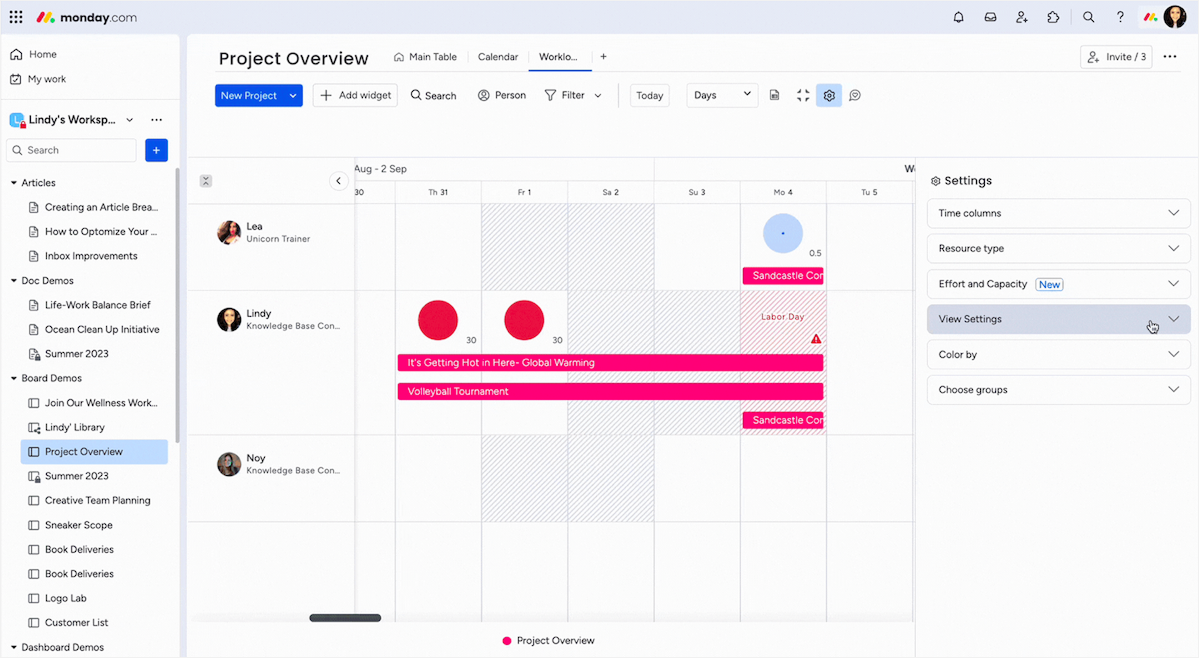
Monday is a general work-management platform built around customizable boards, spanning project management, CRM, and dev use cases for teams of any size. Capacity and resource-management functionality exist as specific, separately-gated features layered on top of the core board product, concentrated almost entirely at the top pricing tier.
Best for: Larger organizations — PMO and portfolio teams — that already run general work management on Monday and are prepared to pay for Enterprise specifically to unlock resourcing tools.
Best feature: An AI "Schedule manager" agent, described on the PMO product page as tracking capacity, flagging allocation issues, and suggesting rebalancing automatically — bundled into monday's broader AI-agent suite rather than sold as a standalone capacity feature.
Core features:
- Workload view: visualize and track team workload — confirmed available only on Pro and Enterprise, not Free, Basic, or Standard
- Resource Planner: Enterprise-only
- Resource Catalog: Enterprise-only
- Performance Manager: Enterprise-only
- Time tracking: Pro tier and up only
- Portfolio management: cross-project view, AI risk analytics, and dashboards — the entire section is Enterprise-only
Best use case: A large enterprise PMO running dozens of concurrent projects across departments, already standardized on monday.com for general tracking, willing to pay for Enterprise specifically to unlock resource planning and portfolio dashboards.
Limitations: Even the basic Workload view is unavailable below Pro — Free, Basic, and Standard users have no workload visualization of any kind.
Pricing:
- Free — €0, capped at 2 seats
- Basic — €9/seat/mo
- Standard — €12/seat/mo
- Pro — €19/seat/mo
- Enterprise — custom, contact sales
Free plan: Real and free forever, capped at 2 seats — and it includes no capacity-planning functionality at all. Workload, Resource Planner, Resource Catalog, and Performance Manager are all unchecked on Free in monday's own feature-comparison table.
Asana — Best for enterprise project teams
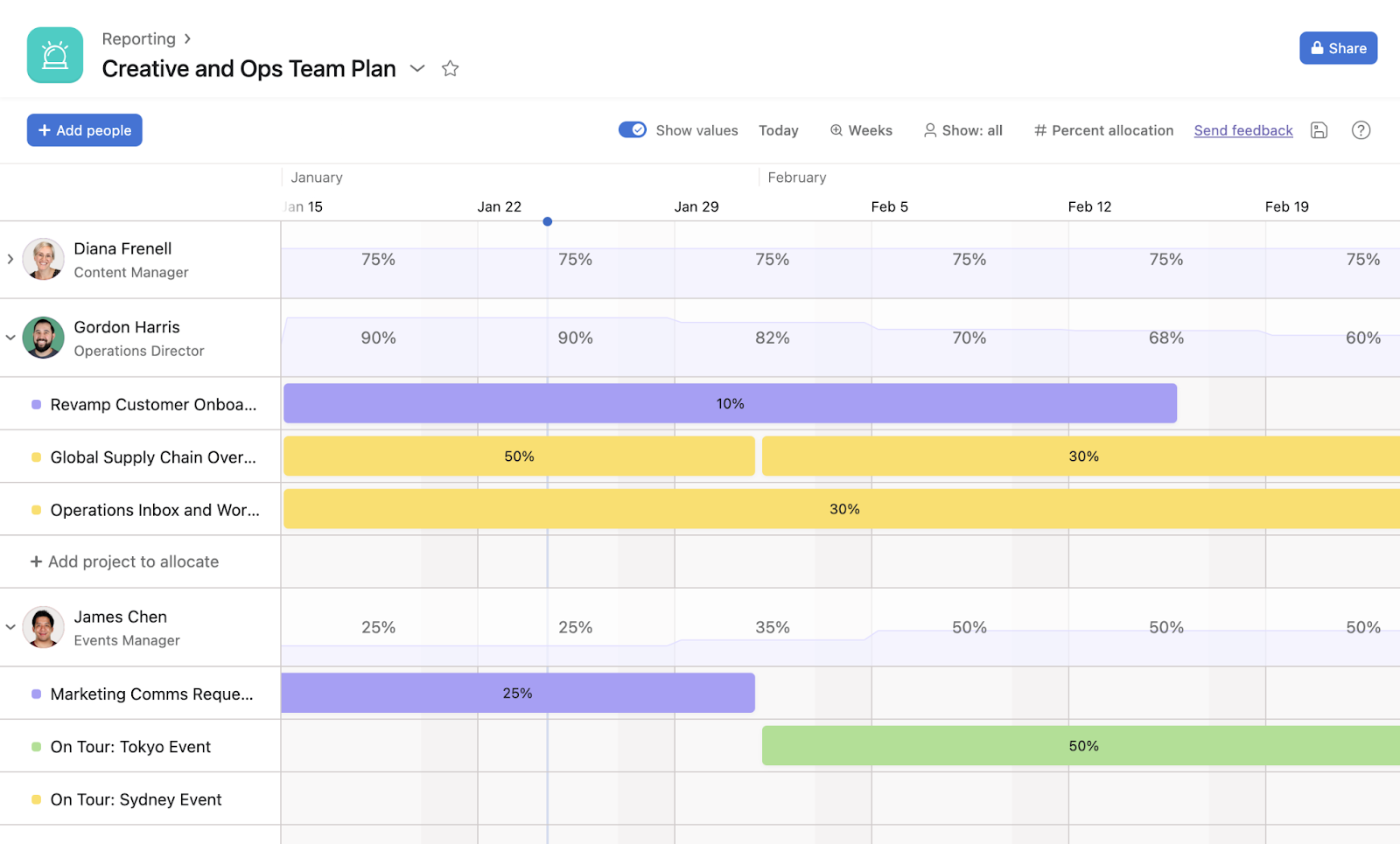
Asana is a general-purpose work and project-management platform used by marketing, IT, product, and operations teams to track tasks, projects, and company goals. Capacity and resource planning exist as modules layered on top of that core task data, rather than being the product's central purpose.
Best for: Mid-size-to-large marketing, creative, or ops departments (roughly 50+ people) already running day-to-day work in Asana who want to layer staffing plans on top of it.
Best feature: A dedicated Capacity Planning tool, separate from the everyday Workload view, that builds forward-looking staffing plans — allocating specific people to specific projects over custom timeframes, by percentage or estimated hours, filterable by skill or role.
Core features:
- Workload view: capacity bars showing how busy each person is across projects — Advanced tier and up, scoped to a single portfolio
- Capacity planning: dedicated tool allocating people to projects over custom date ranges — Enterprise and Enterprise Plus only
- Resource scheduling: drag-and-drop rebalancing directly from Workload or Capacity Planning
- Time tracking: estimated vs. actual time per task, Advanced tier and up
- Financial planning: Timesheets and Budgets — a separate paid add-on with real-time budget monitoring and rate cards
- Portfolio management: cross-project rollups linking Workload and Capacity data into reporting dashboards
Best use case: A 60-person creative operations team running all campaign work as Asana projects on Enterprise, building next quarter's staffing plan by allocating named people to named initiatives at a percentage of their time.
Limitations: The dedicated Capacity Planning tool is Enterprise and Enterprise Plus only, with no published price — it requires a sales conversation regardless of team size. Timesheets and Budgets, the add-on that adds actual cost tracking, is billed separately ($5.99/user/month) on top of whatever base plan a team is already paying, even at Enterprise.
Pricing:
- Personal — $0 forever, capped at 2 users
- Starter — $10.99/mo annual, $13.49/mo monthly
- Advanced — $24.99/mo annual, $30.49/mo monthly
- Enterprise / Enterprise Plus — custom, contact sales
- Timesheets & Budgets add-on — $5.99/user/mo annual
Free plan: Personal exists free forever but caps at 2 users and includes zero capacity-planning functionality — no Workload, no Capacity Planning, no Timesheets. Even the next-cheapest paid tier, Starter, still excludes all of these.
Kantata — Best for enterprise professional services
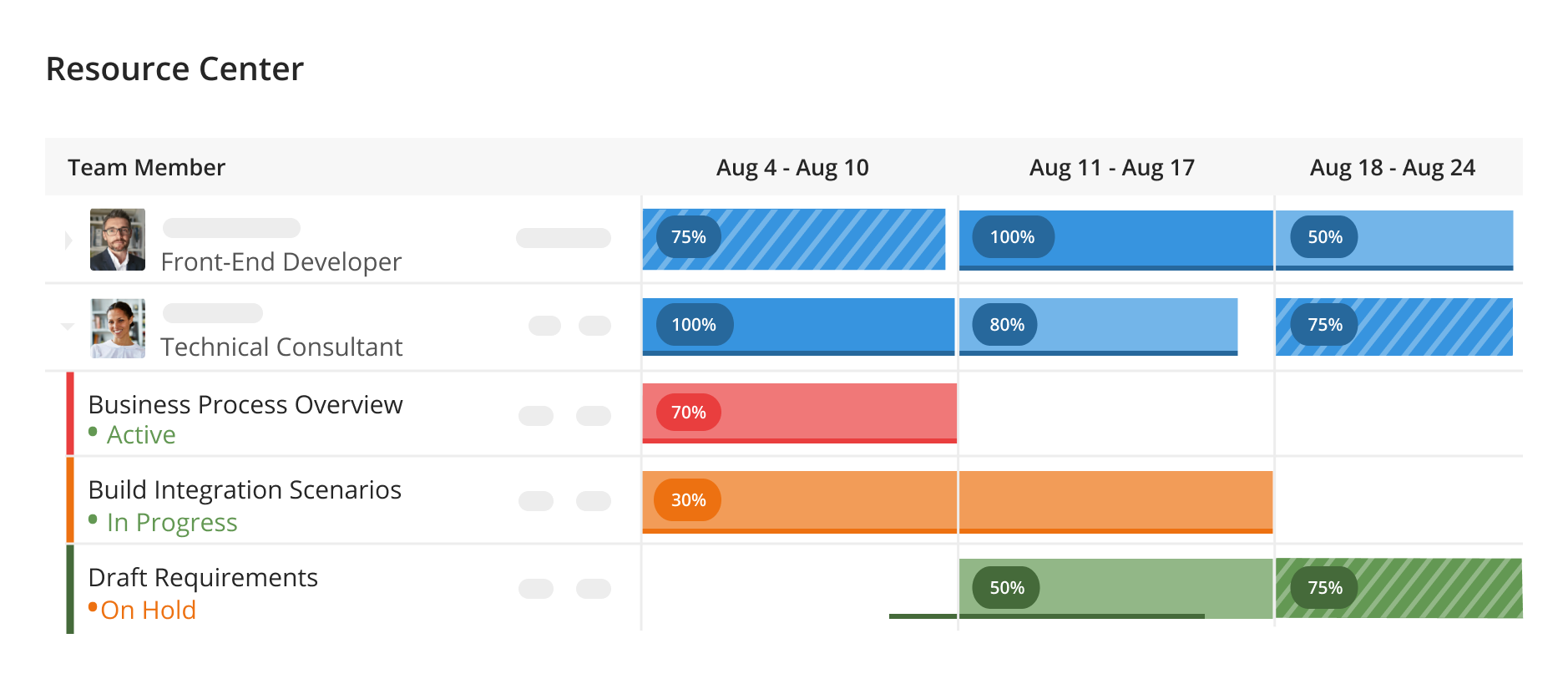
Kantata is a Professional Services Automation platform, not a general project-management tool, built for services organizations — consulting firms, agencies, technology companies — that need to unify project delivery, resource staffing, and financial management in one system. It's sold in two editions: Kantata OX, an open API-first standalone platform, and Kantata SX, built natively on Salesforce for large multi-entity enterprises.
Best for: Mid-market to enterprise professional-services firms running complex, multi-entity delivery operations who need resourcing tied directly to project financials and revenue recognition.
Best feature: AI-driven resource matching using predictive insights to rank staffing recommendations by skill, capacity, location, and predicted project success — plus the ability to “soft book” or “hard book” resources to model multiple staffing scenarios before committing, then compare forecasted vs. actual utilization afterward.
Core features:
- Demand forecasting: resource forecasting and capacity planning tools projecting demand against pipeline, months to a year ahead
- Staffing decisions: AI-ranked recommendations based on skills, capacity, location, and predicted project success
- Scenario planning: soft-booking vs. hard-booking to model and compare multiple staffing scenarios before locking in a team
- Skills matching: a skills inventory mapping capabilities to project demand, surfacing gaps before they hit delivery
- Resource scheduling: talent-network management spanning internal staff and external contractors, with cost rates and availability tracked per resource
- Financial management: forecasted-vs-actual utilization comparison tied to project margin and outcomes
Best use case: A 200-person IT consultancy running dozens of concurrent client engagements needs to evaluate several alternative staffing scenarios for an upcoming deal, see the margin impact of each, and track actual utilization against that forecast afterward.
Limitations: Zero pricing transparency — no tier names, no per-user cost, no minimum team size published anywhere on the site, so cost can't be compared numerically against anything else on this list. Evaluating the product requires booking a demo; there's no sandbox or trial to test it independently first.
Pricing: Not published. The pricing page is a lead-generation form only — no tiers, no currency, no minimum commitment size stated anywhere on the website.
Free plan: None, and no self-serve free trial either. Every call to action across the site is “Watch a Demo” or “Get a Demo” — there's no visible self-serve signup anywhere.
Saviom — Best for enterprise workforce capacity planning
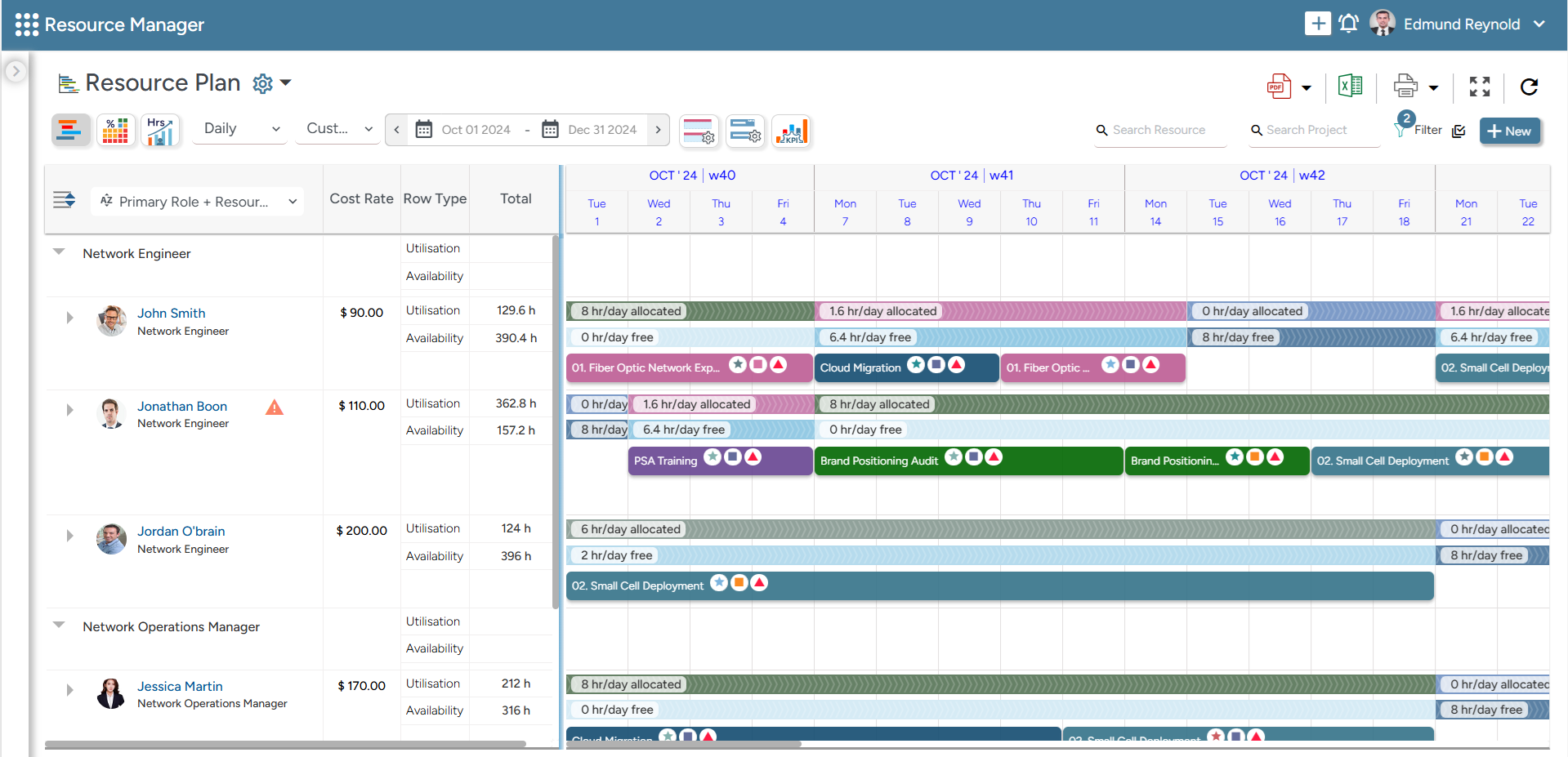
SAVIOM is enterprise resource-management software — one product in a broader suite that also includes separate Workforce Planning, PSA, Project Portfolio Management, and PMO products — built for large, project-driven organizations planning and allocating resources across an entire portfolio, not a single team.
Best for: Large, multi-project enterprises (100+ employees) across resource-intensive industries — IT, engineering, professional services — needing forecasting across a whole portfolio rather than one team's workload.
Best feature: Multidimensional demand-vs-capacity forecasting with scenario modeling — SAVIOM forecasts resource demand from pipeline (not-yet-won) work alongside active projects, compares it against future capacity, and models multiple what-if allocation scenarios before committing people.
Core features:
- Demand forecasting: across both active projects and pipeline opportunities, consolidated across business units
- Scenario planning: compare multiple resourcing plans before committing
- Resource scheduling: allocation matched by skills, availability, and cost
- Resource utilization: tracking and optimization to reduce bench and idle time
- Financial planning: controlling workforce costs and margins tied to allocation decisions
- Reporting: real-time analytics and business-intelligence dashboards
Best use case: A 500-person engineering firm running dozens of simultaneous client projects across multiple offices needs to forecast whether its global workforce can absorb a full pipeline of unsigned work, and model several what-if staffing scenarios before any hiring decision.
Limitations: Saviom's breadth is designed for enterprise resource managers rather than individual project managers. Implementation and configuration are likely to be more involved than with lightweight scheduling tools. Pricing is also entirely unpublished.
Pricing: Not published — quote-only, based on a licensing model separating full-access (”Power”), view-only (”Lite”), and free unlimited (”Non-User”) licenses.
Free plan: None. SAVIOM offers a 60-day free trial, but it's sales-assisted rather than self-serve — it requires submitting a contact form (name, email, phone, company) rather than instant access.
8 things to ask during a product demo
A polished demo can make almost any tool look capable. These questions help you separate what will actually work for your team from what only looks good on screen. The key is to bring your own scenarios instead of letting the vendor stick to their script.
1. Show me everyone's capacity across multiple projects
Instead of walking through one tidy project, it helps to offer five real projects that share the same people. That way, you can see whether the view stays readable when things get messy.
2. Now give this person two weeks of vacation
The key is whether capacity adjusts on its own. If it doesn't, the planning is still manual — the interface just makes it look automated.
3. Make this person 60% available instead of 100%
Part‑time and split allocations are common in practice. A tool that only handles full‑time people cleanly will become a problem later, and it's better to know that upfront.
4. Add a new project that isn't fully staffed yet
This tests whether the tool can represent demand before a real person is assigned — placeholders and tentative roles alongside confirmed bookings.
5. Move this project two weeks later
Then it's worth checking what happens to everyone's capacity as a result. A few tests reveal more about how the tool's planning logic actually works.
6. Show me overloaded skills, not just overloaded people
This becomes more important as the team grows. Fifty engineers on paper means little if only three of them have the one skill the next project actually needs.
7. Show me planned versus actual
This is how you can tell whether the tool's forecasts get more accurate over time.
8. How much of this has to be maintained by hand?
Probably the most important question of the eight. Who updates capacity, assignments, time off, and project demand — and how much of that happens automatically versus falling on one person's shoulders? A plan that depends on someone manually keeping five spreadsheets in sync will drift out of date eventually.
The best capacity software is the one that matches your mode of working
Every tool on this list can show you who's busy. The real differences are in what sits around that view: where your work already lives, how much of the plan updates on its own, and what you have to pay before capacity features actually unlock. Whichever tools make your shortlist, kick their tires by bringing your own reality rather than the vendor's demo script. The tool that still makes sense after that is the one your team will actually keep using.


FAQ
If you’re choosing the best tool for planning a project, you first need to figure out whether you need general task management or capacity planning specifically. Check the key features around resourcing if the real question is whether the team has room for the work.
The right capacity planning software depends on team size, industry, and where the work already lives. Dedicated tools like Float, Runn, and Ganttic go deep on resourcing as standalone platforms; Planyway does the same directly inside Jira or Trello, which matters more than advanced capacity planning tools bolted onto a general work platform if that's already where your team's work sits.
ClickUp offers free-forever project management, though capacity features sit behind a paid tier. For teams already in Jira, Planyway's own free tier covers instances up to 10 users, capacity planning included.
A capacity planner tracks overall capacity against expected demand, using historical data to forecast demand instead of reacting week to week — data driven decision making in place of gut-feel scheduling. Day to day, that's plan future projects and revisiting them as new future projects land. It also feeds strategic planning and strategic priorities with real numbers instead of guesses.
Free tiers typically cover general project management, while capacity features usually sit behind a paid plan. Paid tiers often add an intuitive interface built for scheduling, billable hours reporting for agencies, and enough measurable business value — fewer double bookings, more accurate forecasts — to justify the cost.