Jira leave management: how to handle employee time off and vacation tracking

Sit in on enough retros, and you'll hear some version of the same line, usually from whoever owned the task that slipped: “I misjudged it; I couldn't estimate how long it would take.” Everyone nods, and the team promises to size work more carefully next sprint, which sounds fair, except that when we look back at sprints like that with the Jira teams we work with, the estimate itself was often fine. The plan assumed five people for two weeks, while in reality, one of them was on vacation, and another was out sick on Tuesday — what looked like bad estimating was a calendar problem.
In this article, we go through how Jira leave management works with the tools Jira already has, where employee time off and vacation tracking tend to slip through the gaps, and which habits help a team see absences while there's still time to change the sprint plan.
Does Jira have leave management?
Not really, or at least not in the way people hope when they type that question into a search bar. There's no screen where someone enters their days off and no place where a manager sees who's out next week, but Jira isn't completely blind to time either, and knowing where its knowledge stops saves a lot of searching through settings.
What Jira knows about working days
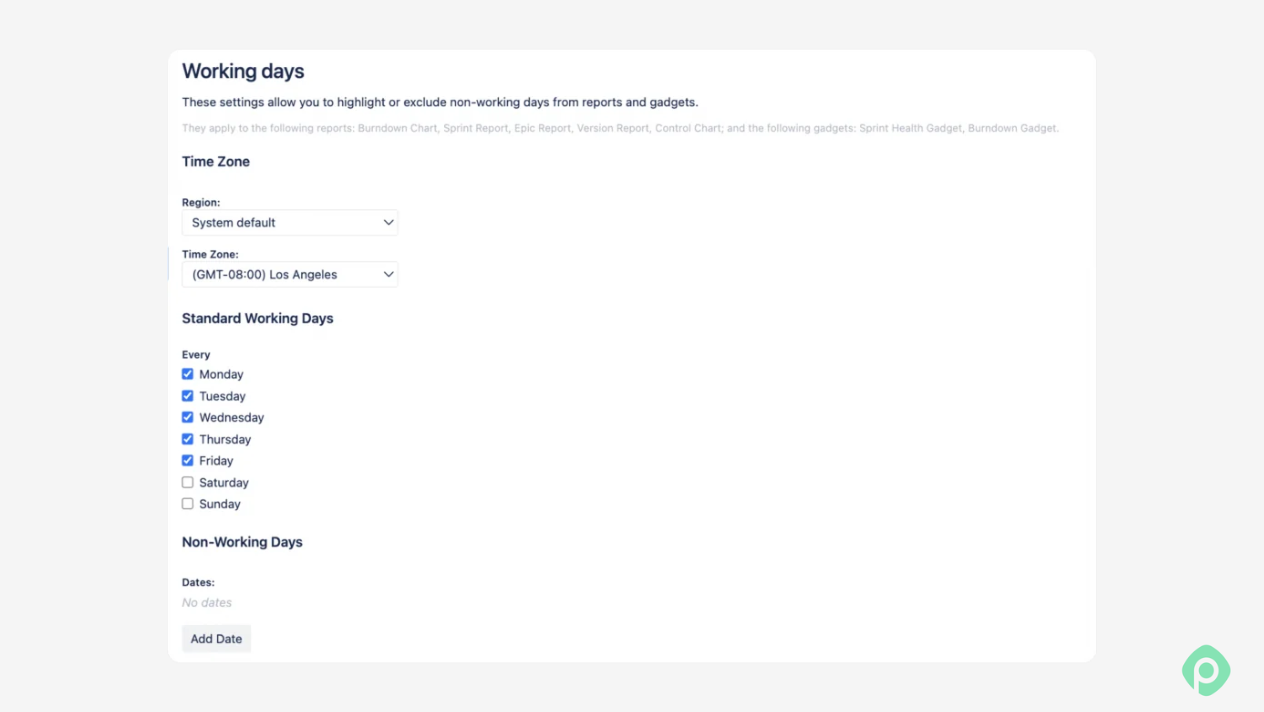
Every company-managed board has a Working days page under board settings, where an admin picks the standard working days, adds specific non-working dates like public holidays, and sets the board's timezone. It's a real setting, and it's worth filling in, but it only feeds the burndown chart, the sprint, epic, version reports, the control chart, and a couple of gadgets, so it changes how your charts look without changing anyone's capacity.
Plans has its own version of this, where you can set how long a working day is and how many working days a week the plan assumes, again for the whole plan rather than for any one person.
What Jira doesn't know about people
Everything below the team level is missing. Jira doesn't know that Marta is on vacation next week, that Tom works 30 hours instead of 40, that half the team is in Germany and has a public holiday on a day the US half is working, or that someone called in with sick leave this morning. It can't hide weekends on the native timeline either. That's why many teams resort to all kinds of workarounds to factor in time-off in Jira.
Employee time off tracking in Jira: 6 options compared
There are basically six ways teams handle time off tracking around Jira. Each of them has a use case — along with the trade-offs.
| Option | Setup effort | Per person or per team | Public holidays | Updates capacity on its own | Side effects |
|---|---|---|---|---|---|
| Dummy “Leave” work items | Low | Per person | Only if someone creates a ticket for each one | Partly, if the ticket has an estimate | Clutters the backlog and reports, leave details visible to anyone with project access |
| Velocity or capacity override in Plans | Low | Per team | No | No, someone changes the number by hand | The reason for the change gets lost |
| Spreadsheet | Medium | Per person | Yes, if you add them | No | A second system, usually understood by one person |
| Shared team calendar | Low | Per person | Yes | No | Lives outside Jira, checked when someone remembers |
| Jira Service Management portal | Medium | Per person | No | No | Handles requests and approvals, but no balances or capacity |
| Marketplace app | Medium, once | Per person | Yes, by country | Yes | Another app to pay for and maintain |
Dummy “Leave” work items
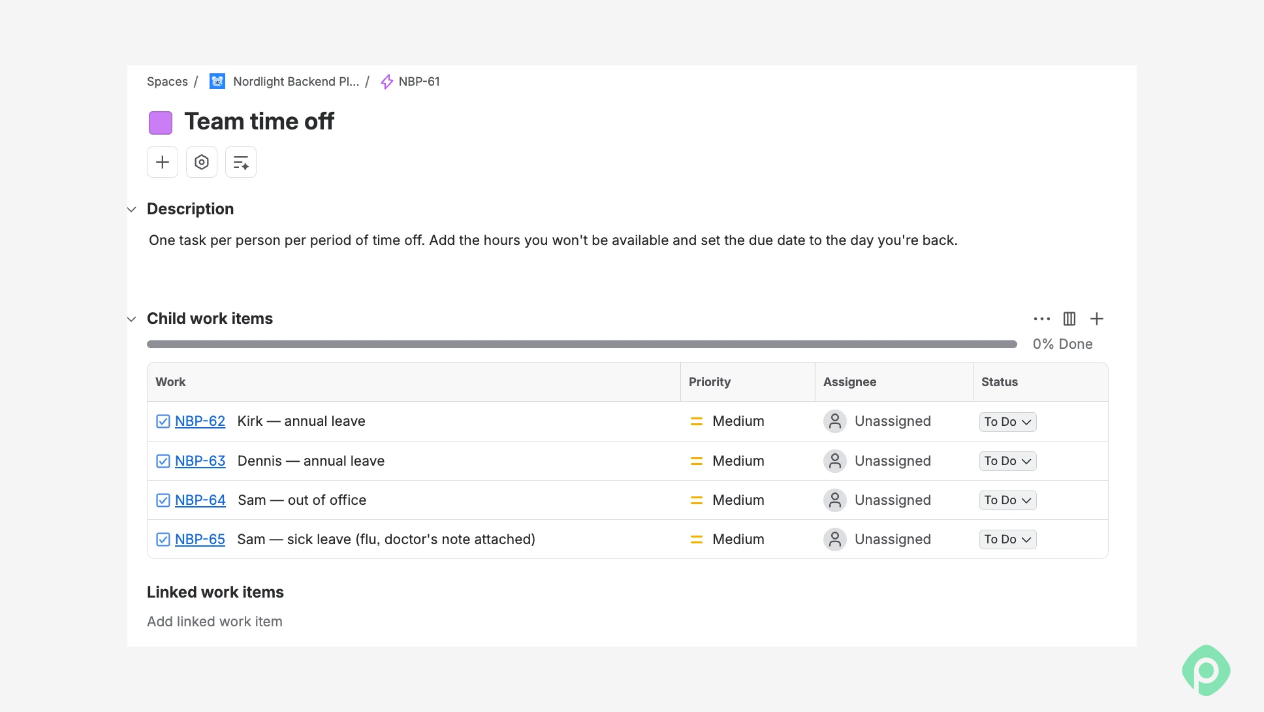
For a team of five who all work the same hours and take a couple of vacations a year, a “Leave” ticket here and there does the job. Grow past that, and the tickets start to get underfoot with no calendar to look at, no balances, and a board full of PTO cards between the real work.
Pro tip: Teams that stick with this usually create a separate work item type called “Leave” and exclude it from the board filter, sprint reports, and velocity; otherwise, vacations show up as work the team didn't finish. Keep the summary neutral, just “Out of office” and the dates, and put the hours someone is away in the estimate, so capacity drops where it should.
Velocity or capacity override in Plans
The closest thing to a native option is in Plans, where you can click a sprint and override the team's capacity or velocity for that sprint, so a short-staffed two weeks gets less work. It helps, but it's a single number per team. It doesn't record why it went down, and there's no concept of team member absences or per-member capacity in the new planning. If someone is on leave for two weeks, the team has to adjust capacity manually in every sprint.
Spreadsheet
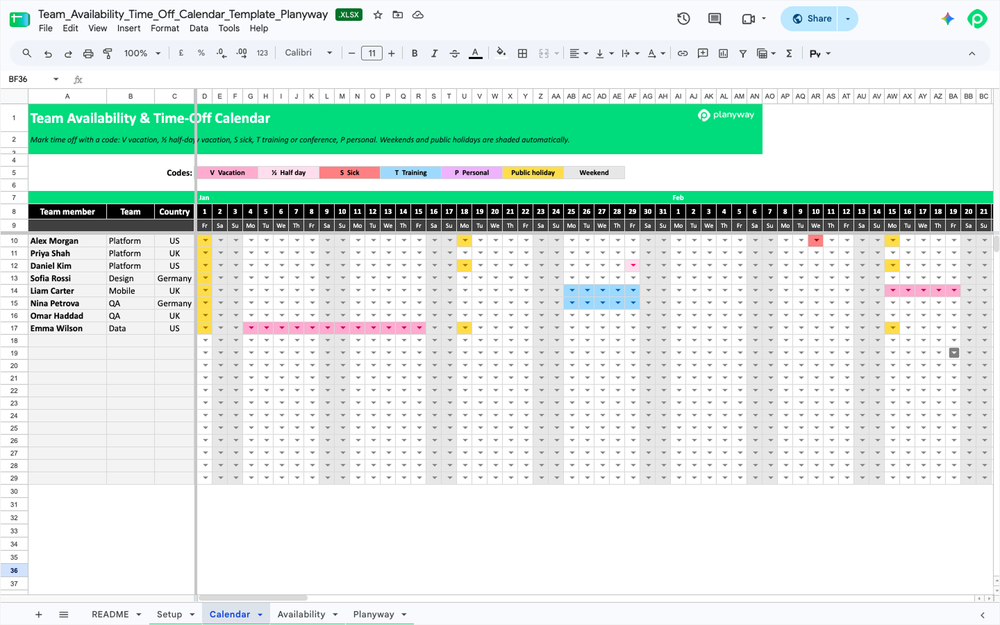
A spreadsheet is a decent stopgap if one person runs planning and actually keeps it up-to-date. Some teams get surprisingly far with it, like the PM who calculated sprint capacity with holidays and vacations in a spreadsheet full of macros. It breaks the day that person goes on vacation themselves.
Pro tip: to make it work, keep one spreadsheet and make it the only one, since three half-updated lists are worse than none, and give someone the job of keeping it current, with a backup for when they're away themselves.
➡️ If you’re starting from scratch, try one of our capacity planning templates for Excel or Google Sheets.
Shared team calendar
A shared team calendar is the easiest thing to set up and the easiest to ignore. It gives everyone real-time visibility into who's out, but nothing connects it to your workload, so it helps people avoid booking meetings with absent colleagues more than it helps to plan.
Pro tip: to make it work, use one shared team calendar for absences only, so time off doesn't get lost among meetings, and ask people to add their leave there the day it's approved.
Leave requests through a Jira Service Management portal
If you already have Jira Service Management, its free HR service management template gives you a self-service portal with request types and approvals, so people can request time off through a form and managers approve it in a queue.
Atlassian did exactly this internally at one point, with employees submitting leave requests through a service desk portal and approved requests landing automatically on a Confluence calendar. For PTO requests and approvals, it does a decent job, although we've watched people fill in the form, pick their dates, and then message HR anyway, because nothing on the portal tells them how many days they have left, so in practice, it works as a request inbox while the actual PTO tracker lives somewhere else.
Pro tip: what helps here is sending each request to the person's own manager, so the people who know the sprint are the ones who review requests, and adding an automation rule that posts approved leave in the team channel or calendar, since that's where whoever plans the next sprint is going to look anyway.
Marketplace app
A Marketplace app is the only option that treats an absence as an absence, rather than as a fake task or a lower number. Some apps focus on the HR side, like vacation tracking software with leave schemes and approvals, and others on planning, where time off reduces capacity per person. If you plan more than one team or people work different hours, this is where most teams end up.
How to set up employee leave management in Jira with Planyway
Planyway for Jira is our all-in-one app for project planning, resource management, time tracking, and reporting. It’s available on the Atlassian Marketplace and works inside Jira. You can plan work across projects on one timeline, see who has room to take it on, and compare the hours your team logs with what you planned.
Unlike native Jira, Planyway lets you add custom work schedules, vacations, and country-specific public holidays — all visible on the timeline and automatically deducted from each person’s capacity.
Here's how to set up time off and leave management for your team with Planyway — without leaving Jira.
Step 1: Set individual working hours
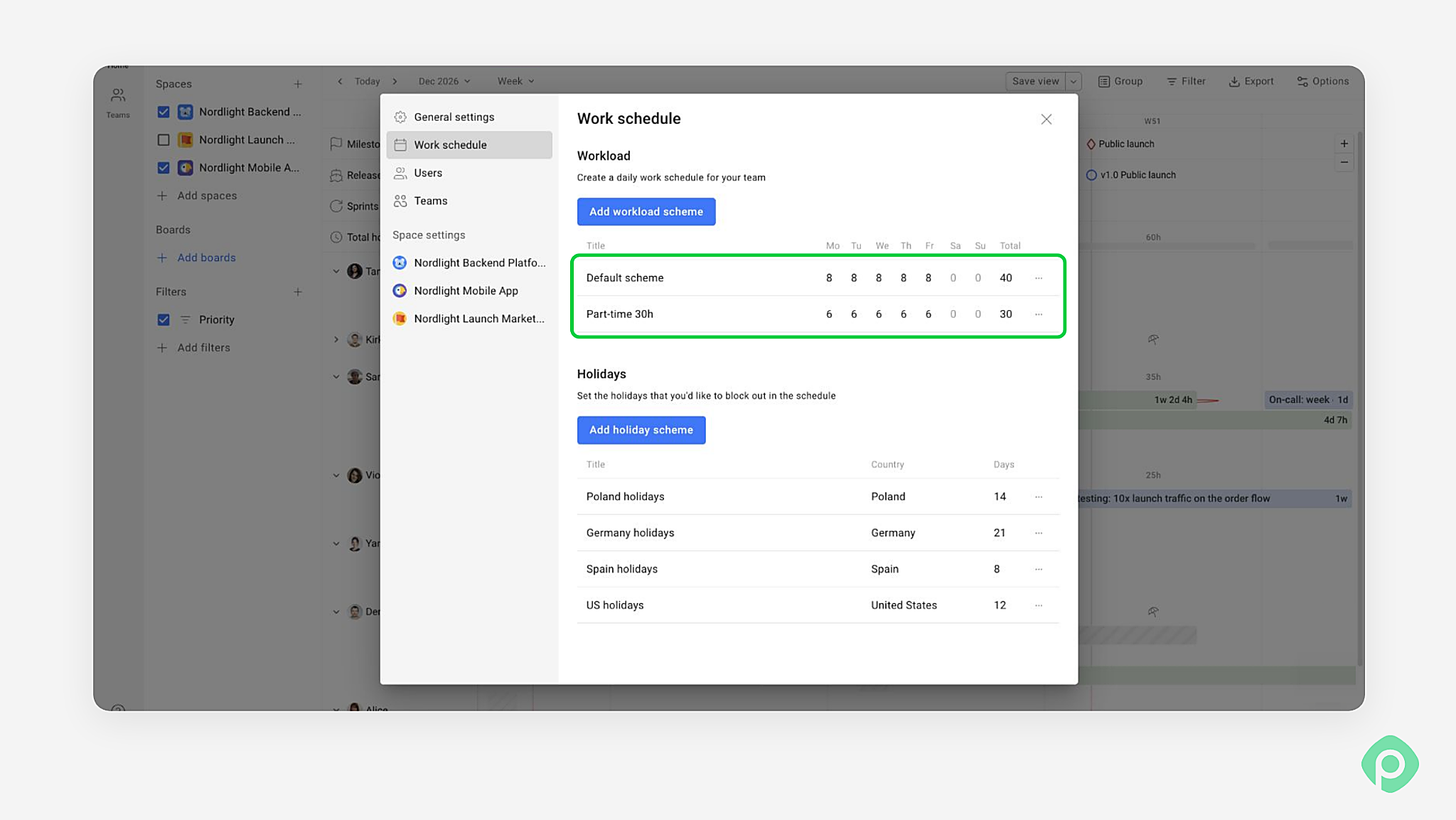
On our Nordlight team, Violetta works six hours a day, Monday through Friday. Her Part-time 30h schedule gives her 30 hours in a normal week. Sam works eight hours on those same days, so his week starts at 40.
Step 2: Pick a holiday scheme by country
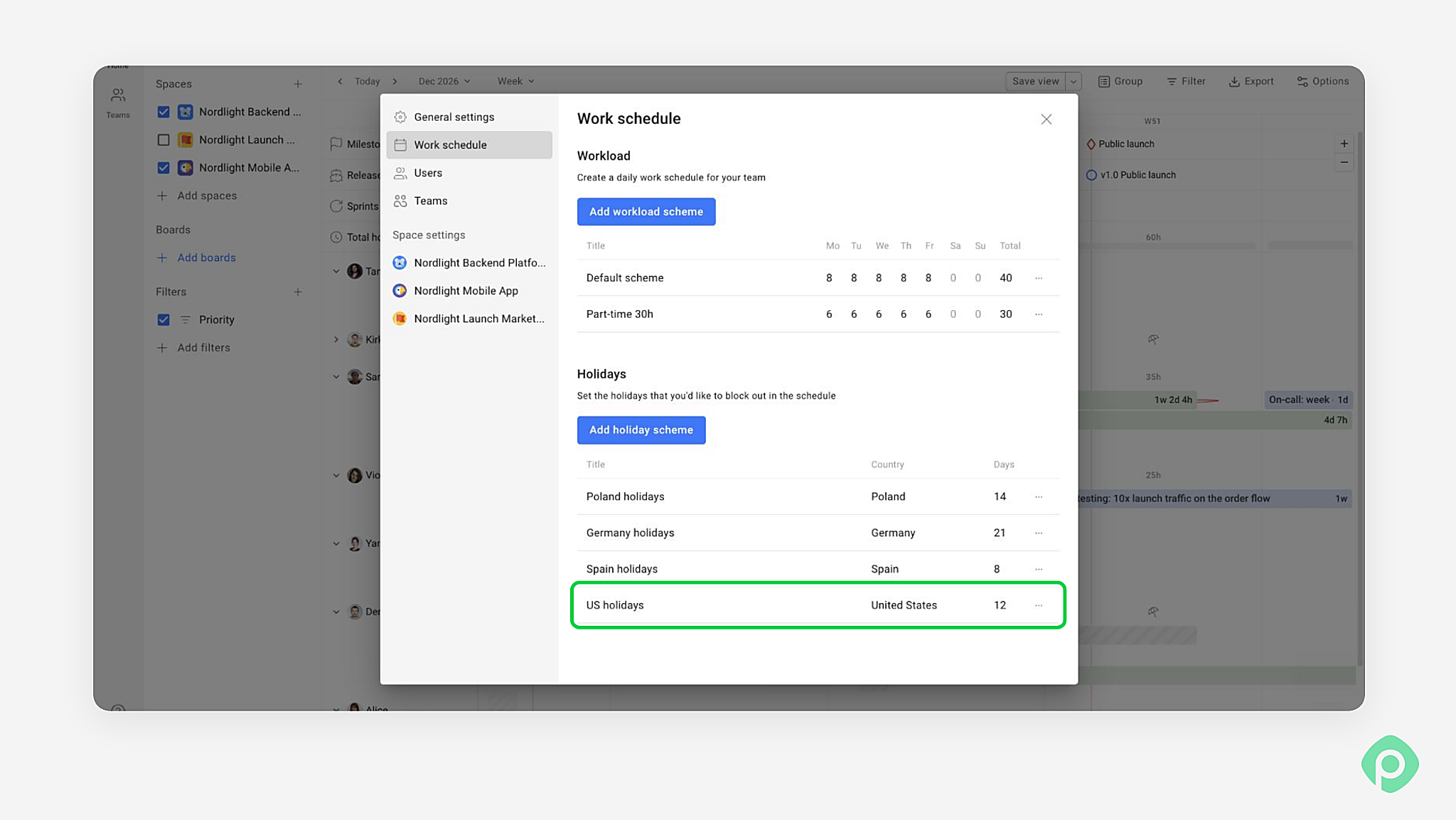
Violetta and Sam both follow the Polish holiday calendar. If a public holiday falls on a Monday, Violetta’s capacity for that week drops from 30 hours to 24, and Sam’s from 40 to 32. Kirk follows the German calendar, Dennis the Spanish one, and Alice the US one.
Step 3: Add annual leave, vacations and days off
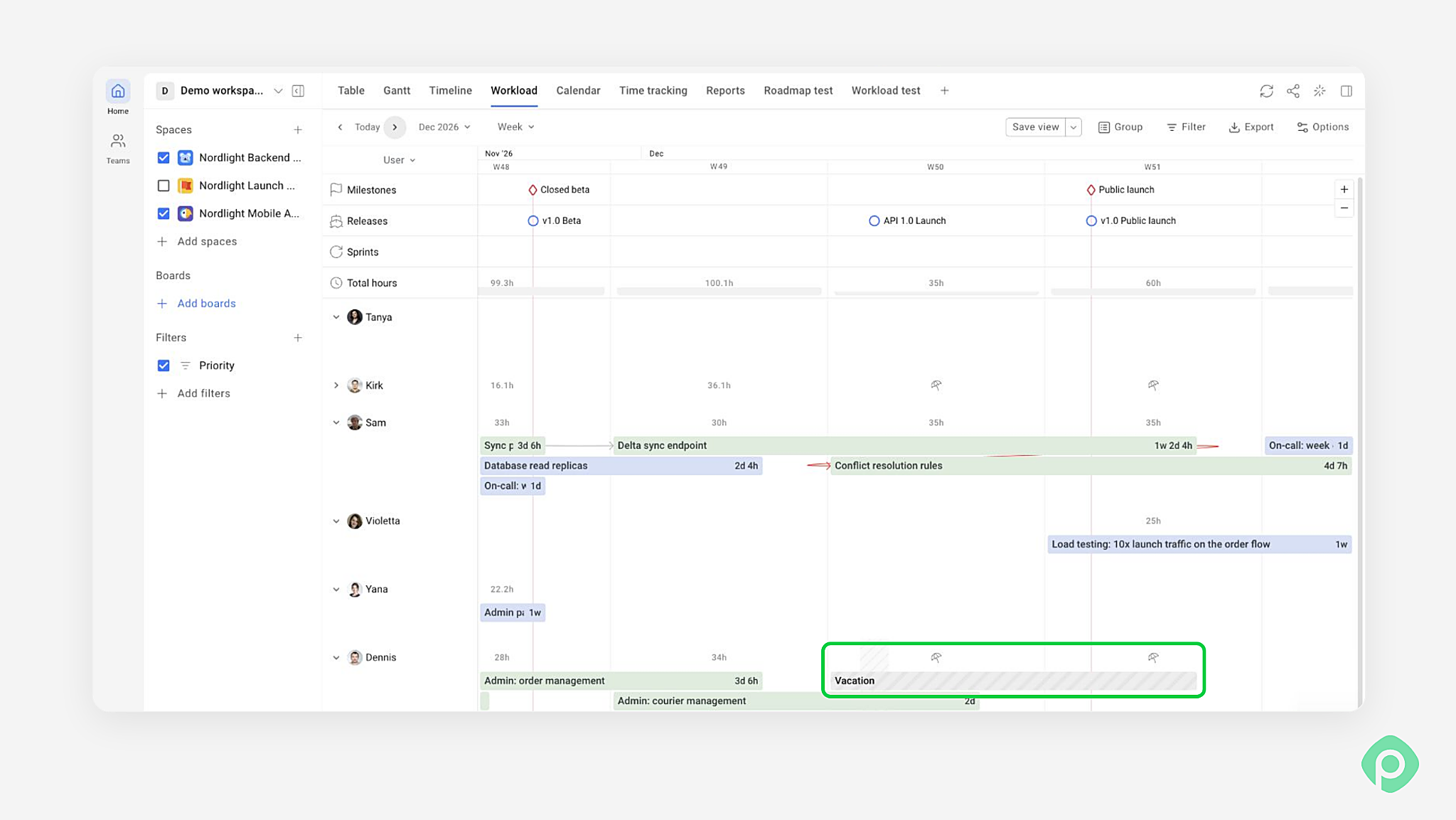
Say Violetta takes Thursday and Friday off in an otherwise ordinary week. Add one time-off entry for those dates. Her available time drops to 18 hours, and her absence appears alongside the Jira issues already on her timeline.
Step 4: See absences in your team's workload
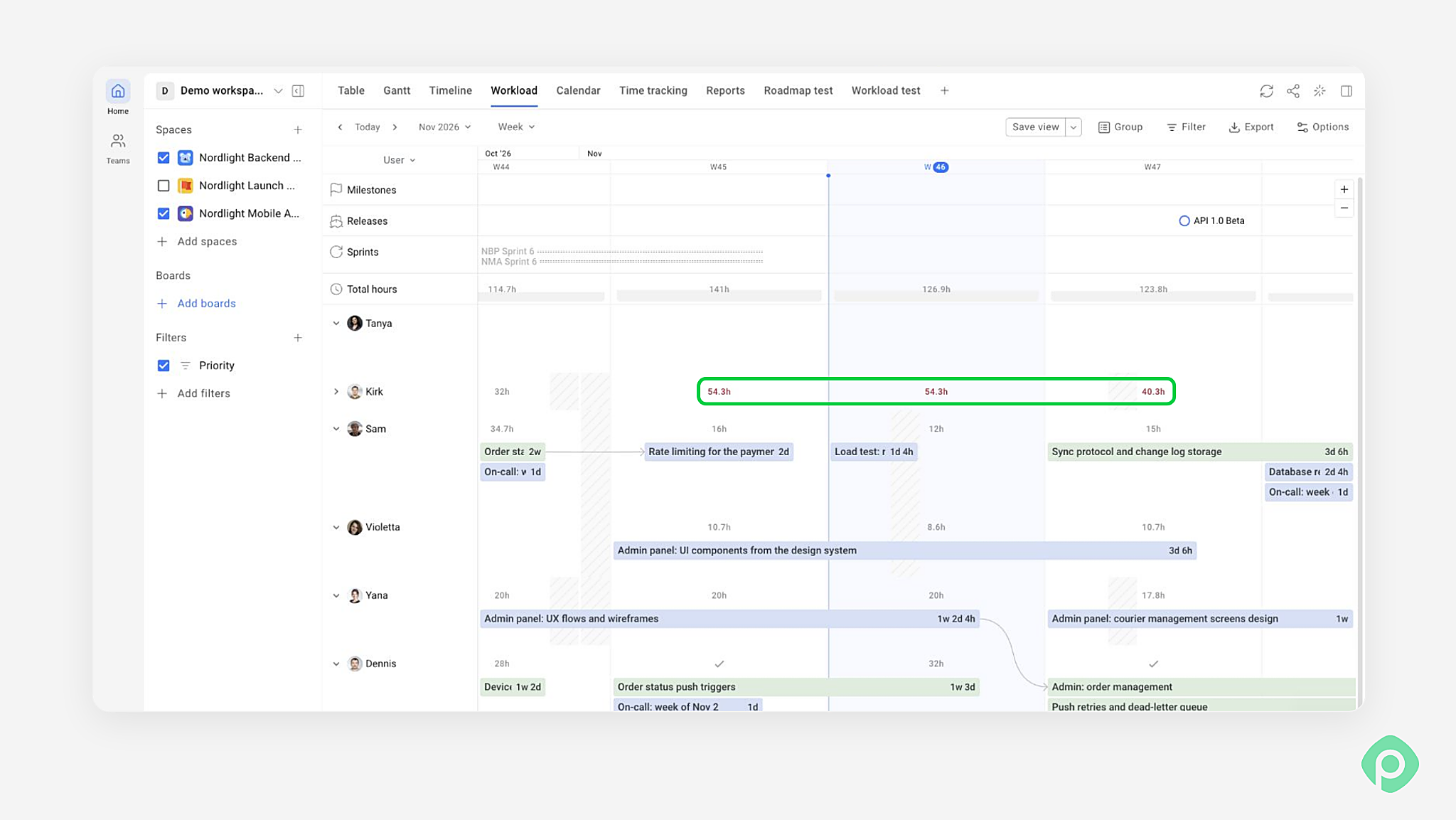
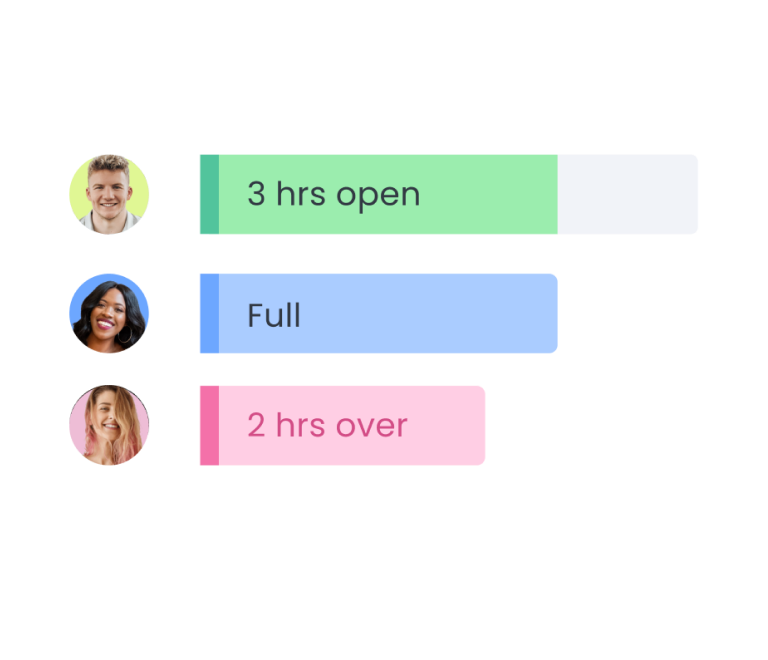
Suppose Violetta has 24 hours of work planned across those three remaining days. She now has six hours more work than she can fit. The red workload indicator flags the overload, and the issues beneath it show what’s competing for her time.
Step 5: Move work around the gaps
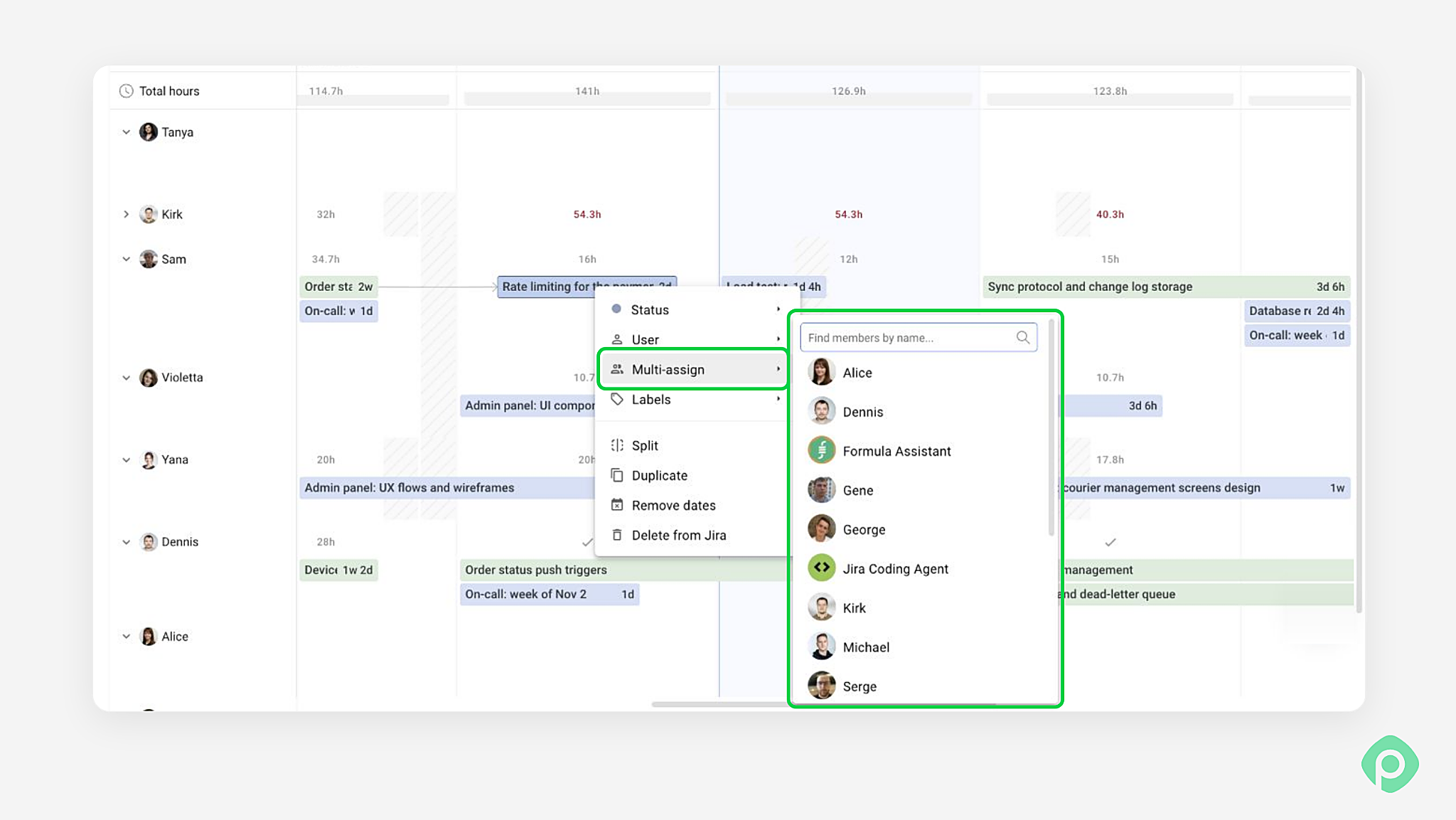
Start with the deadline. If an issue can wait until Violetta is back, move it. If someone needs it on Friday, check who has room to cover. When Violetta can finish part of the work before she leaves, you can split the effort with a teammate and keep both contributions on the same Jira issue.
Step 6: Check the hours in Timesheets
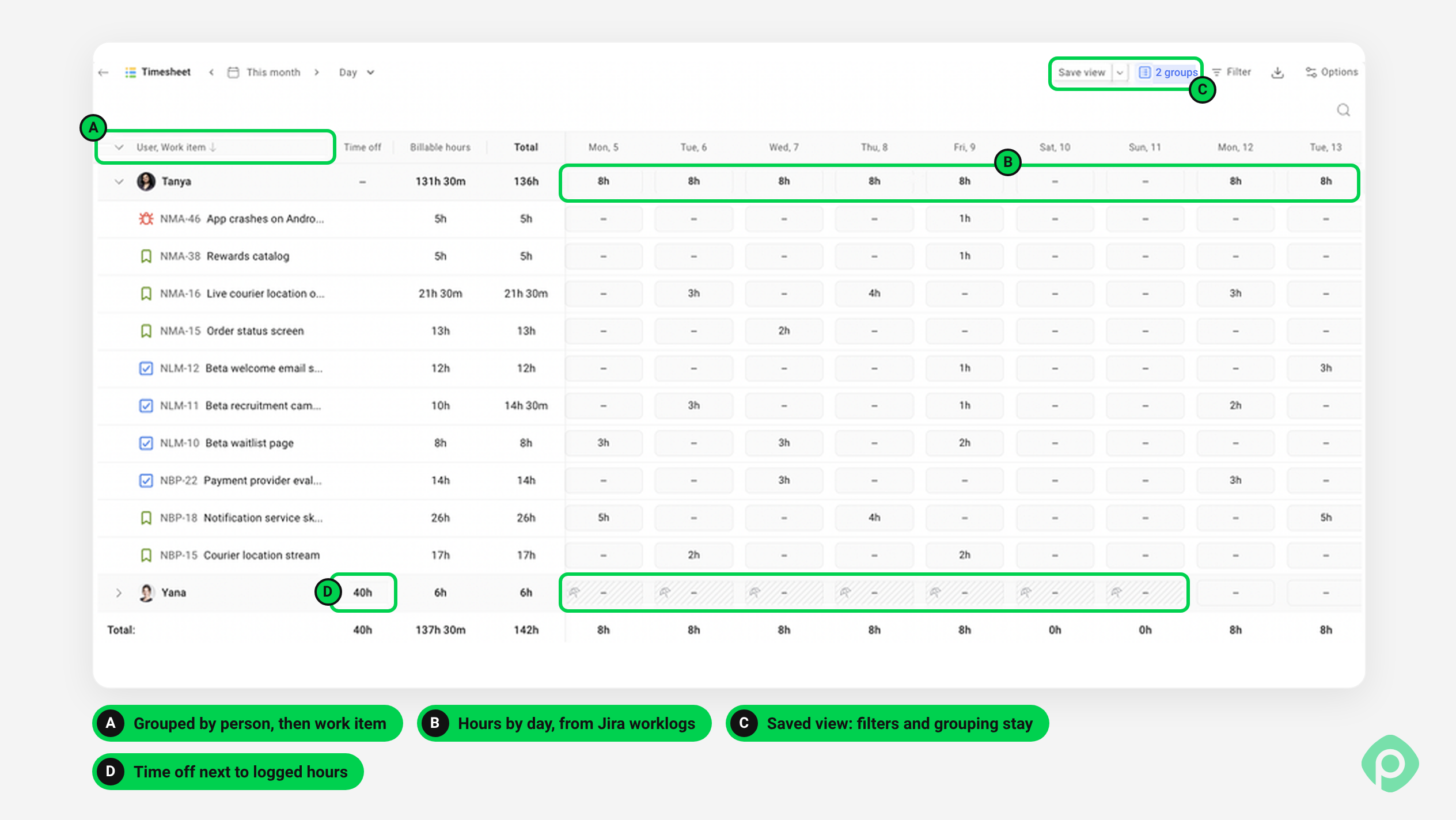
When the sprint is over, Planyway's Timesheets shows whether the plan held. Open the team's week or month, and you'll see who logged fewer hours than planned — including the days someone was out. You can also easily share the timesheet with the team, or export it as a PDF for anyone who needs the record outside Jira.
What is leave management? Requests vs. planning
Before picking a tool, it helps to pull apart two jobs that usually get lumped together under “leave management”, because most of the confusion in Jira comes from trying to make one tool do both.
Leave requests: the HR side
Leave requests are the part HR owns, and the flow is familiar to anyone who's ever booked a holiday: you request leave, your manager says yes or no, the days come off your balance, and the whole thing ends up in payroll. All the fiddly stuff lives here too, time-off policies, accruals, carryover, sick leave rules and whatever local labor law says.
Leave planning: the delivery side
Leave planning is the part delivery owns. Marta's leave is approved for next week, so does the sprint still hold, and who picks up her half of the migration? That question needs much less data, just a person, a date range and capacity maths. HR keeps the source of truth for “Can I take these days?” and your planning tool only needs to know the result so it can answer, “Can we still ship this?”
Where absence management fits
Absence management sits between the two. It's the habit of looking at absence trends over time, like the same team losing a week every August, a spike in sick days during flu season, or one person's leave always landing on release weeks, and using that to plan instead of being surprised every year. HR sees the pattern in their reports, delivery feels it in missed sprints, and the teams that handle leave well are the ones where somebody connects the two.
What HR handles in leave management, and what planning needs
HR's side of leave management is bookkeeping that has to be right to the day, since people accrue paid days every month, each leave balance partly rolls over into next year, and time-off policies limit how many people from one team can be out at once. That's a lot to track by hand, so HR usually lets software manage paid time and keep remaining balances and PTO balances right. People get employee self-service, often in a mobile app, where someone on the train home can see their employee balances and ask for the Friday before a long weekend, and their manager can approve or deny requests from the same screen.
After that, the dates travel on to employee records and payroll systems, and because paid days and personal leave land on a payslip differently, a lot of payroll errors in payroll records and benefits administration start with someone retyping dates at the end of the month. The legal implications live on that side too, like the Family and Medical Leave Act (FMLA) with its 12 workweeks of job-protected unpaid medical leave, jury duty, paid sick leave laws, and doctor's note rules that vary across employee locations.
A team lead needs a lot less than that — really, just who's out and when. HR keeps the balances and the paperwork, which is the simplest way to ensure compliance, and once leave is approved, someone adds it as time off in whatever planning app the team already uses, so the gap shows up while there's still time to change the sprint plan. Ideally, the team sees a plain “Vacation” block there rather than a work item called “Marta, sick leave, back problems”, which is the kind of compliance risk nobody means to create.
Leave management process: 6 habits that make it work
A tool helps, but most of the pain comes from timing. These habits make a leave management process work, whatever you use.
Keep absences in one place
Decide where time off lives and tell everyone. We've seen teams where HR had one list, the team calendar another, and Jira a third, and on any given Tuesday, at least two of them disagreed about who was in.
Check availability before planning, not after
Make it the first thing you look at in sprint planning. Finding out on day three that someone's away doesn't help anybody, and it's exactly how time off data turns into a missed sprint goal.
Add public holidays at the start of the year
Public holidays don't move. Put every country's calendar in at the start of January, and the Monday holiday in one office stops ambushing the sprint every few months.
Leave slack in every plan
Someone's kid will bring home a cold, someone's flight home will get cancelled, and none of it is on any calendar yet, so we'd leave a bit of room in every sprint and more in long projects, since unplanned absences are guaranteed even if their dates aren't.
Plan coverage for busy periods
August and December empty the office in most companies we work with, with half the team out in the same fortnight, so lighter sprints for those months, and the habit to plan coverage early for anything customer-facing, beats being surprised by the same busy periods every single year.
Ask people to add time off as soon as it's booked
A vacation added two months ahead is a planning input, while the same vacation added the day before is a fire drill. The rule we like is simple, add it to the plan the same day you book the flights, and it'll save time for everyone who plans around you.
Why bad estimates are really a time-off management problem
The problem usually isn't estimation but invisible capacity: the plan assumed five people while one was on vacation and another was out sick — that's a leave management issue, not an estimate. Jira already holds most of what's needed to close this gap: make absences visible before the plan is committed — through marketplace apps, calendar integrations, or disciplined use of existing fields and boards — and the team will stop having the same conversation at every retro.


FAQ
You can add holidays in Jira, but only as non-working dates on a board, which tidy up the burndown and sprint charts without changing anybody's capacity. There are no country calendars and no holidays per person on top of that, so the teams we talk to either keep one holiday work item per date or turn on a per-country holiday scheme in an app like Planyway.
Employee vacation management in Jira works out of the box only through workarounds, usually a work item for the vacation assigned to the person, or a capacity override in Plans. With Planyway, you mark time off on the timeline, and it shows up in the Workload view and in the person's capacity.
Jira capacity planning accounts for time off only roughly. You can lower a team's capacity or velocity for one sprint in Plans by hand, but Jira still has no idea which person is out, for how many days, or what their normal week looks like.
You can't hide weekends on the native Jira timeline, since the days are built in. Planyway takes each person's working days and hours into account, so weekends and days off don't count as available time.
You can record when someone is on paid time off in Jira, but Jira won't keep balances, accruals or approvals. For PTO tracking as HR sees it, use HR software, and for planning, an app like Planyway makes sure PTO comes off the person's capacity.
The difference between time and leave management is what they measure. Time management, or time tracking, is about how employee time gets spent on work and where people log hours, while leave management is about when people aren't working at all, and absence and leave management feeds into planning because you can only fill the hours someone is actually there.
If the user's job is to approve a request and check the balance, the relevant tools are Hrvey or Attendance and Leave Management for Jira. If the job is to understand how someone's vacation affects the sprint plan, that's Planyway. The distinction is not which tool is better, but which question each one answers: "can she take the time off" versus "what does that mean for delivery."