Best Jira apps and plugins for resource and capacity planning: top 10 tools

Native capacity planning and resource management in Jira are fairly limited out of the box. Jira Premium and Enterprise offer Plans for team-level planning and a newer Capacity view for individual resource allocation. However, the latter still has a fixed 40-hour workweek as a default option, doesn't support individual working schedules, and limits allocations to epics and higher-level work rather than individual tasks. Not so convenient.
So, to manage project resources effectively without jumping through many hoops, teams often turn to Jira resource management plugins. These tools help project managers plan available resources, balance workloads across multiple projects and teams, and connect resource allocation with existing Jira tasks and project timelines for easier project progress tracking.
But what capacity planning tools integrate with Jira? In this article, we’ve boiled it down to Atlassian marketplace apps specifically and compared 10 of them based on their resource management features, capacity planning capabilities, pricing, and limitations to help you choose the right tool.
Jira resource allocation apps at a glance
The short version first. Each line says who the app suits best; the cards below explain why.
- Planyway for Jira by Planyway: best for teams that need to plan and balance workloads across multiple Jira projects based on actual availability, including individual working hours, vacations, and holidays, with resource planning, roadmaps, time tracking, and reporting in one app.
- ActivityTimeline by Reliex: best for teams that need detailed people scheduling, skills-based staffing, and tentative resource bookings.
- Capacity Planner by Tempo Software: best for teams already on Tempo Timesheets who want connected resource planning and capacity reporting in hours or full-time equivalents.
- BigPicture by Appfire: best for PMOs running large portfolios of agile, waterfall, and hybrid projects.
- Portfolio by HeroCoders: best for Cloud teams that want cross-project portfolio views alongside individual capacity planning.
- ProScheduler by DevSamurai: best for project managers who need resource scheduling alongside Gantt-based project planning.
- Capacity for Jira by Deiser: best for PMOs that want a simple weekly calendar of who's free.
- Resource Planning for Jira by DS Solution: best for teams that need a free allocation planner for Jira projects, operational work, and external resources.
- Workload & Capacity Planner: Team Heatmap by Simplify: best for team leads who want a quick overload check.
- Float: best for teams that want a standalone resource planner for staffing across projects, with custom working schedules, time off, and tentative bookings.
The 10 best Jira resource management plugins
1. Planyway: one view for timeline, workload, and tracked time across projects
Planyway for Jira is an all-in-one Jira app that combines project planning, portfolios, resource management, time tracking, and reporting — all in one subscription. So, here, resource management (that lives in the Workload view) happens in context: you can see who has capacity across projects, assign work around their availability, and check how those assignments fit the release schedule.
Designed specifically for teams working in Jira, it has a two-way Jira integration. It means that Planyway for Jira uses your existing issues and data, including assignees, sprints, and start and end dates.
Key features for resource management:
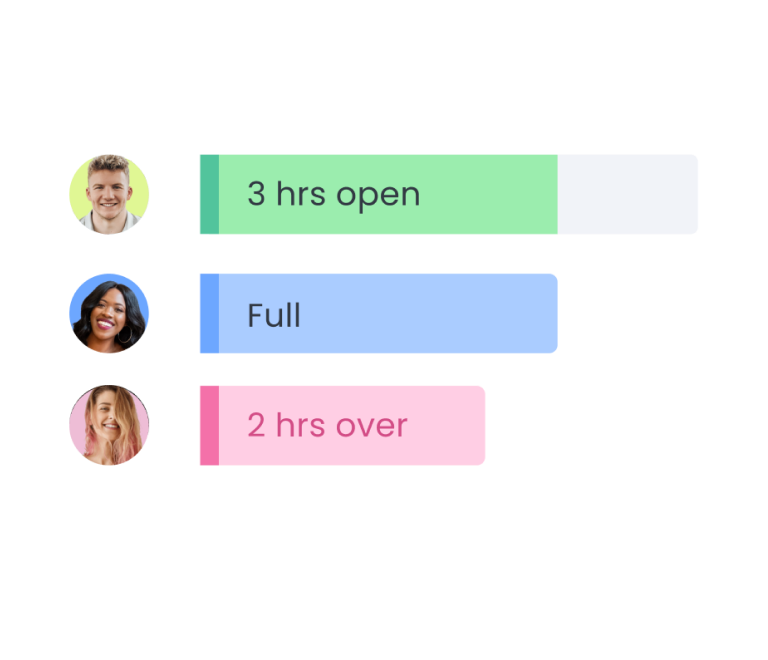
- Each person has a utilization bar that turns red when their scheduled work goes over capacity, including work they have in other connected projects.
- A four-day week or part-time schedule is set per person, while vacations, sick days, and public holidays automatically adjust each person’s individual capacity on a heatmap.
- You can assign work by dragging a card onto someone’s row, and a task that’s too big for one person can be split between teammates, each part with its own dates and estimate.
- Work lands on the timeline by task dates, sprint dates, or custom date fields. Alternatively, estimate-based scheduling adjusts its duration to fit the planned effort.
- One cross-project view shows the projects you’ve connected, with individual and combined team capacity. Workload and Planned vs. Tracked reports help you review resource utilization and compare estimates with actual effort.
- Planyway’s Risk AI Agent checks estimates, availability, and workload across projects to flag delivery risks and explain what’s behind them.
Trade-offs:
- Planyway is a planning tool for Jira, not a full PPM suite, so there are no OKRs or risk matrices.
Platforms: Jira Cloud and Jira Data Center.
Pricing: Free for Jira Cloud instances with up to 10 users. Monthly pricing starts at $3 per user, with lower rates for larger instances. All features are included in one subscription. Cloud customers pick monthly or annual billing, and Data Center comes as a yearly license. The free trial includes every feature.
2. ActivityTimeline by Reliex: a staffing schedule per person
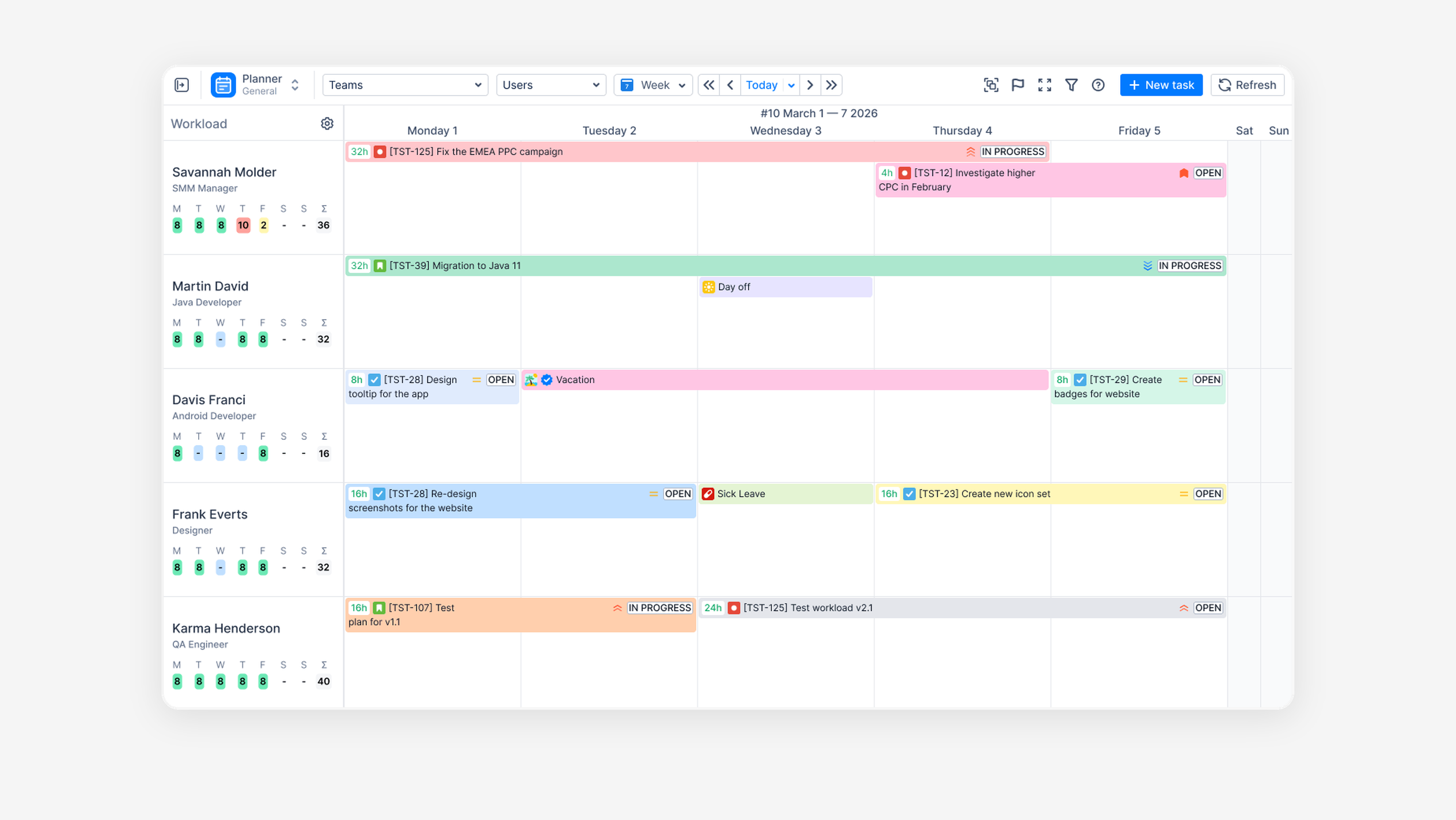
ActivityTimeline is a Jira resource planning and time tracking app built around people and their availability. Its Planner shows assignments across projects on individual and team timelines, helping managers see who can take on work and where schedules overlap.
Key features:
- The planner lets a lead book a person for specific days, and one issue can go to several people.
- Workload indicators and a Team Capacity Chart show allocated hours, available capacity, and potential bottlenecks.
- A team calendar holds leave and vacations, so a day off shrinks that person's capacity.
- Bookings and placeholders let managers reserve capacity before the final Jira tasks are ready.
- Skills and positions help managers find suitable people for upcoming work.
- Utilization and availability reports help managers review resource allocation across teams and projects.
Trade-offs:
- Accurate capacity planning depends on keeping working schedules, leave, team membership, and estimates up to date.
- Skills-based staffing requires skills and positions to be configured and maintained.
- Bookings and placeholders need to be reviewed as tentative demand turns into confirmed work.
- Some features require ActivityTimeline’s higher-priced Advanced edition.
Platforms: Cloud, Server, and Data Center.
Pricing: Standard is $10 a month flat for up to 10 users, then $2.50 per user for 11–100, $1.80 for 101–250 and $1.30 for 251–1,000. Advanced starts at $15 flat. The trial is 30 days and needs no card.
3. Capacity Planner by Tempo: plans in full-time equivalents
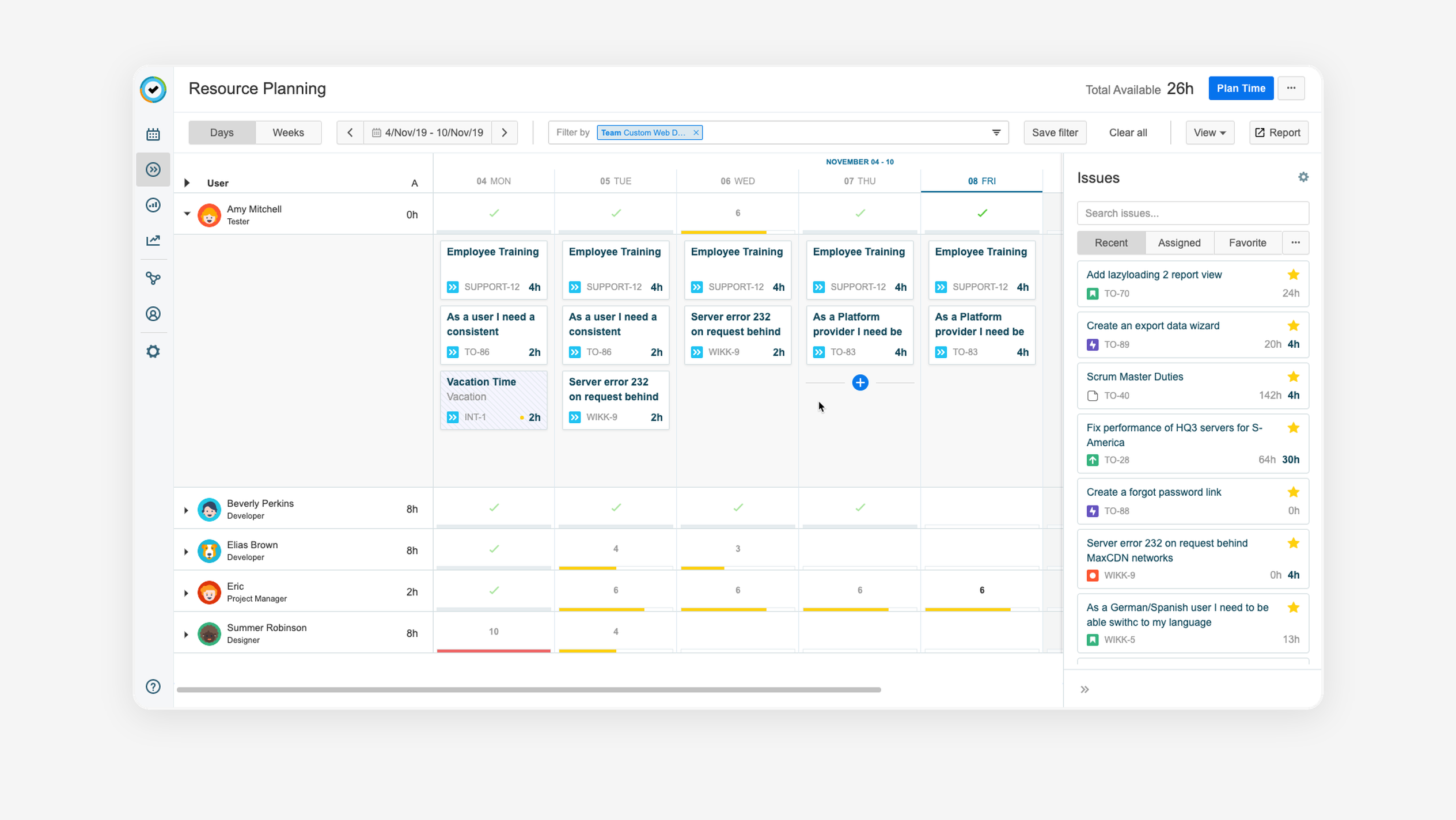
Capacity Planner, formerly Tempo Planner, is Tempo's people planner for Jira and one of the go-to resource management tools. Teams plan at project, epic, or ticket level and see supply and demand in full-time equivalents, which suits leads who talk about "two FTEs on the redesign" rather than hours.
Key features:
- Team capacity is shown in hours and FTE, with weekly, monthly, and quarterly indicators.
- Skills and roles help a manager find someone with the right profile and spare time.
- Plan approvals let team leads confirm what their people have been booked for.
- Workload schemes cover part-time schedules and country holidays.
- Google and Office 365 calendar events can turn into plans automatically.
Trade-offs:
- Comparing the plan with actual time needs Tempo Timesheets, and cost forecasts need Financial Manager. Both are separate subscriptions.
- It makes the most sense inside the Tempo stack; on its own it's one of the pricier options.
- The Marketplace rating is 3.7 from 200 reviews, lower than most apps here.
Platforms: Cloud, Server and Data Center.
Pricing: $11 a month flat for up to 10 users, then $4.39 per user for 11–100, $2.64 for 101–250 and $1.69 for 251–1,000. Free trial. Your Tempo license tier has to match your Jira user tier.
4. BigPicture by Appfire: a full portfolio suite
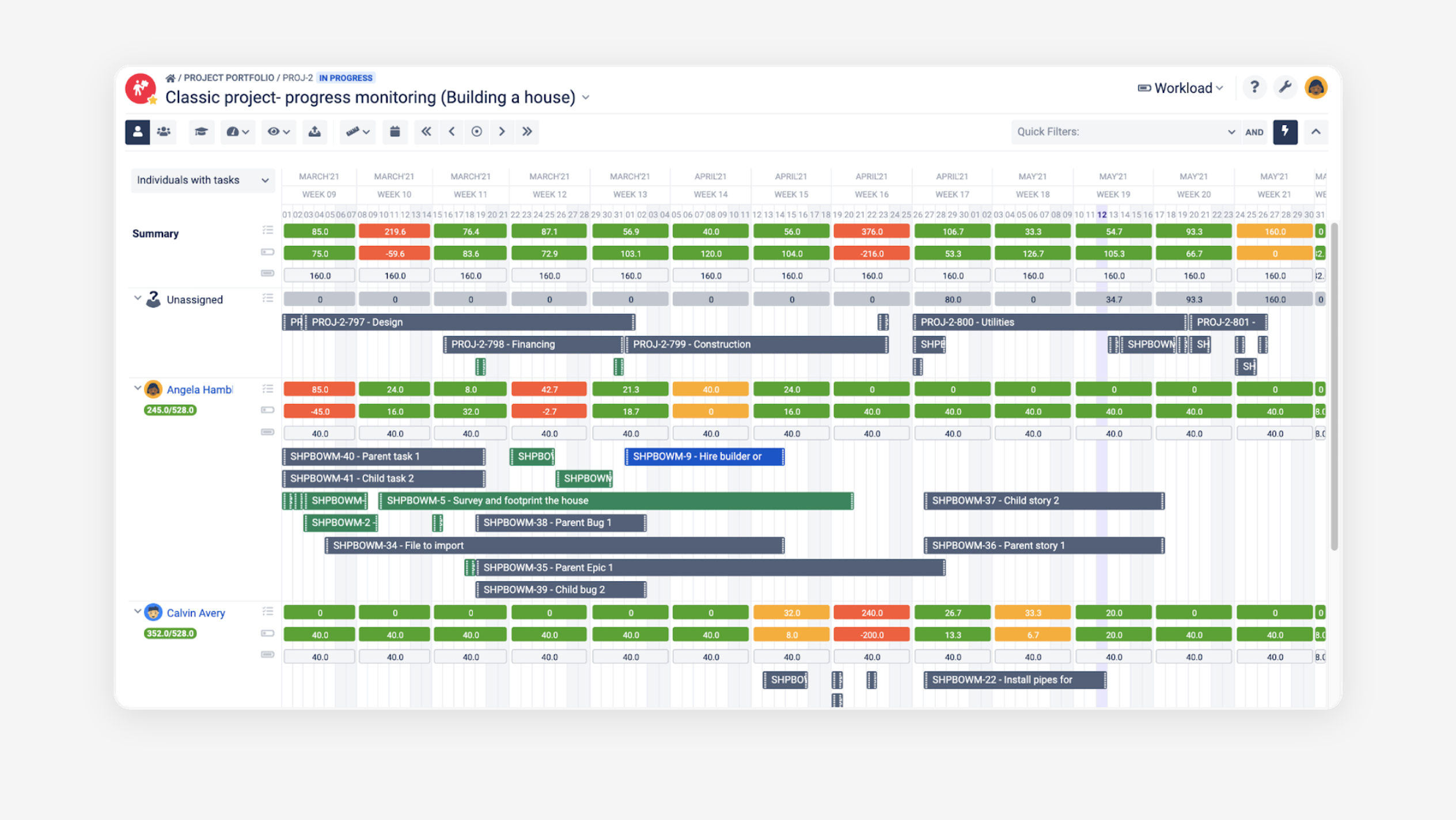
BigPicture is an all-purpose project management tool from Appfire. Its Resources module helps managers allocate people and teams across projects simultaneously, compare workload with available capacity, and plan around skills and absences. It suits organizations that need resource planning as part of a broader portfolio-management process, and want that big picture (pun intended).
Key features:
- Individual and team resource views show assignments, workload, and remaining capacity, with color-coded indicators for overload.
- Tasks can be scheduled and reassigned directly in the Resources module.
- Working-hour calendars, holiday plans, and individual absences determine available capacity.
- Skills-based planning helps match people and teams with the skills required by tasks.
- Workload calculations can use original estimates, remaining estimates, or story points.
- What-if scenarios let managers compare changes to the plan before applying them.
Trade-offs:
- Rolling it out usually takes weeks and one person who learns it inside out.
- Availability across different teams is not automatically validated, so combined allocations can exceed 100%.
- Workday absence synchronization requires the higher-tier offering: Advanced on Cloud or Enterprise on Data Center.
- On a 50-user site, the base edition already costs more than most other apps do.
Platforms: Cloud, Server, and Data Center.
Pricing: Standard costs nothing for the first 10 users. After that you pay $5.73 a user up to 100 users, $4.80 from 101 to 250 and $1.58 from 251 to 1,000. Advanced starts at $100 a month for a 10-user site and jumps to $10.57 a user in the 11–100 band. The trial runs 30 days.
5. Portfolio by HeroCoders: portfolio and capacity at a low price
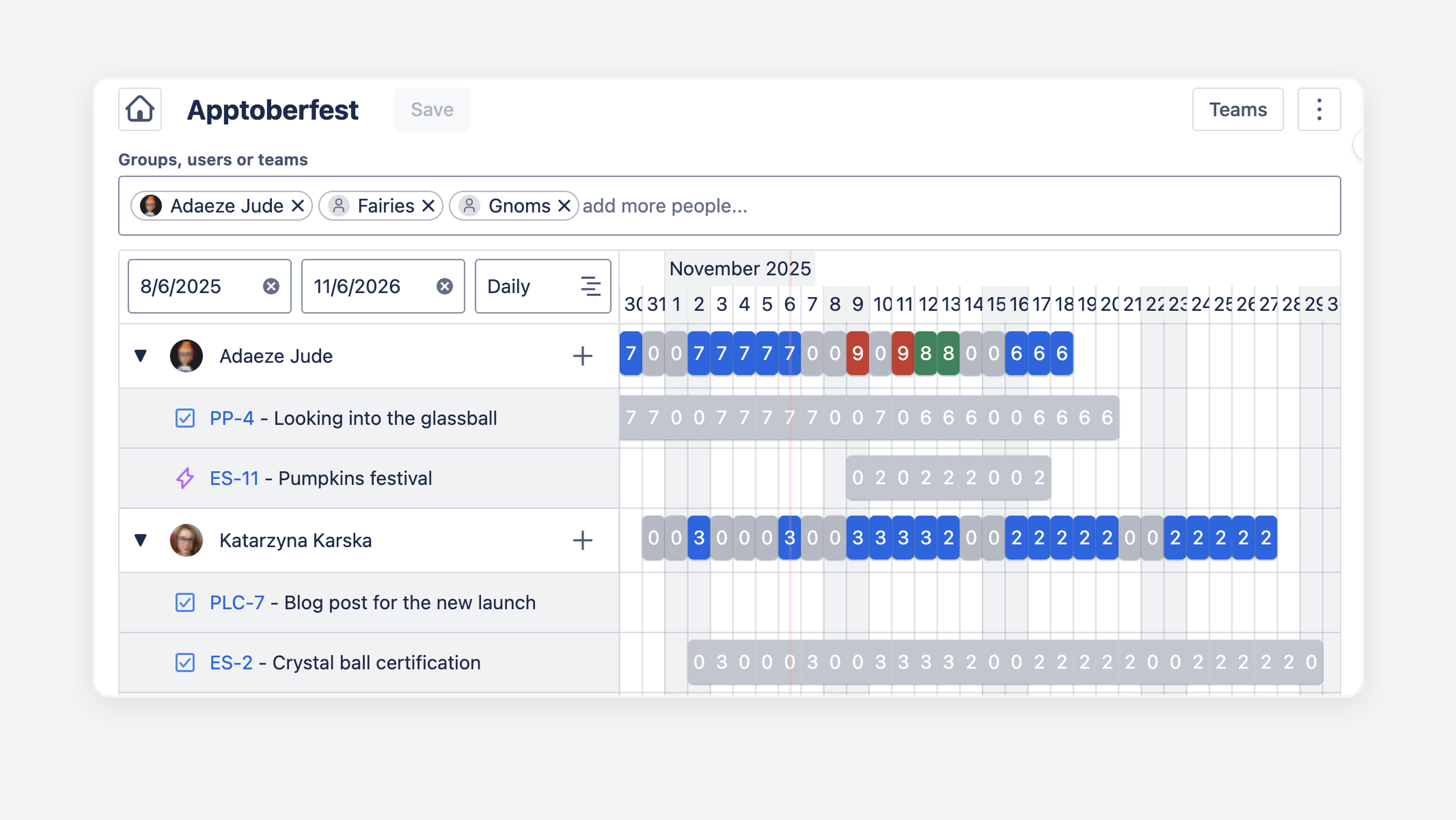
Portfolio by HeroCoders evolved from Epics Map into a portfolio and capacity planning app for Jira. It combines project hierarchy views with a Capacity Planner for reviewing availability and assignments across projects.
Key features:
- Daily, weekly, and monthly capacity views use color-coding to show who is overbooked, fully booked, or available.
- Holiday calendars, vacations, and sick leave update availability in the Capacity Planner.
- Unplanned Jira work can be assigned directly from the planner. Bookings can be moved, resized, or split, with changes reflected in Jira.
- Capacity alerts flag overbooked assignees in portfolio views and link to their capacity plans.
- The Advanced edition adds roles, skills, and resource requests for planning future demand and finding available people who match it.
Trade-offs:
- There's no Data Center version.
- Roles, skills, and future resource requests require Portfolio’s higher-priced Advanced edition; core capacity planning is included in Standard.
Platforms: Jira Cloud.
Pricing: Standard is free up to 10 users, then $0.90 a user for 11–100, $0.70 for 101–250, and $0.30 for 251–1,000. Advanced is a flat $5 for a 10-user site, then $1.30, $0.80 and $0.40. There's a free trial for both.
6. ProScheduler by DevSamurai: Gantt charts with a workload view
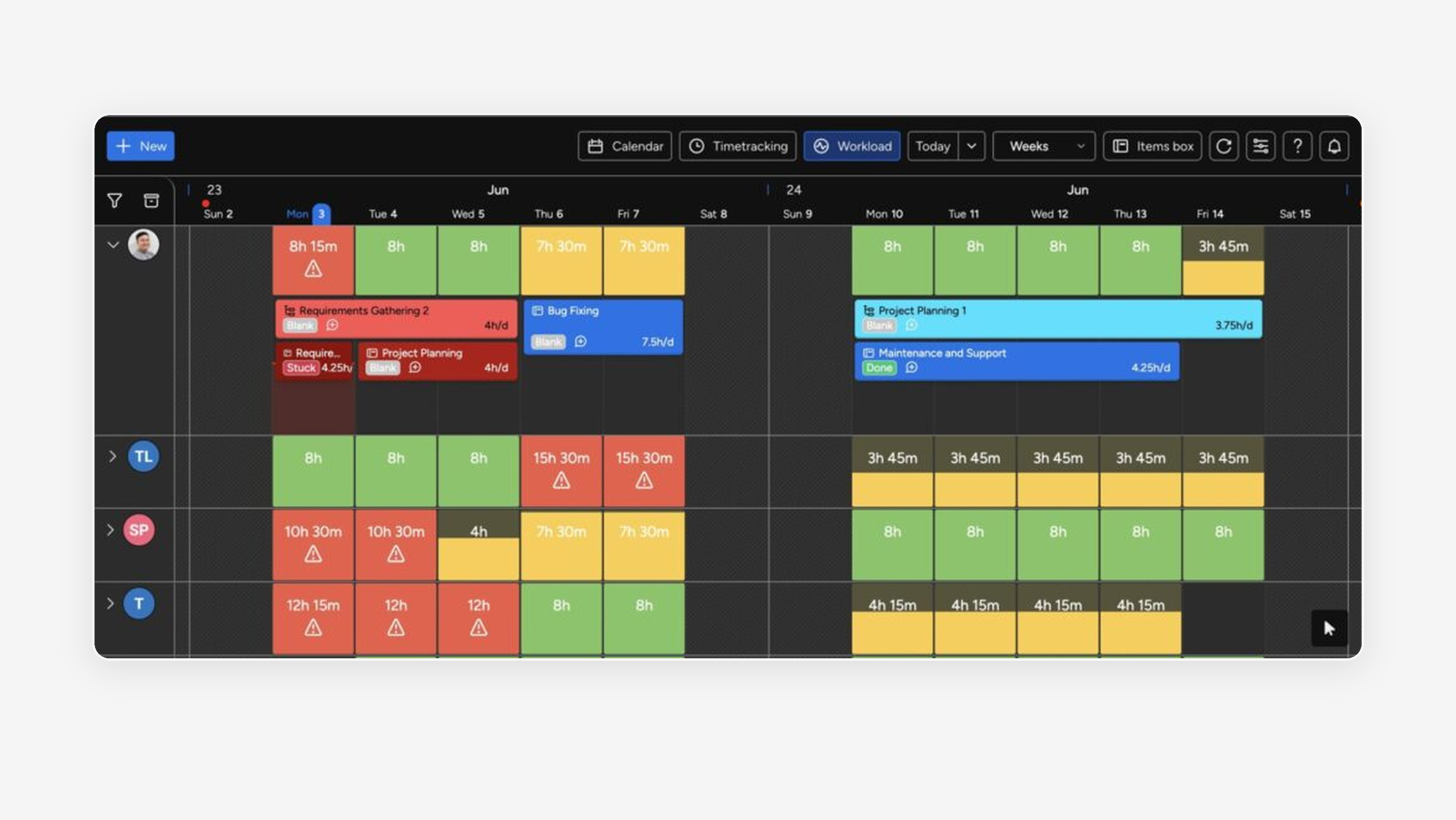
ProScheduler is DevSamurai’s project and resource planning app under the TeamBoard brand. It combines a Schedule Board, Calendar, workload views, and Gantt charts to help managers allocate resources in Jira and check how the schedule fits people’s availability.
Key features:
- A workload heatmap compares scheduled hours with working capacity to highlight overloaded and available team members.
- Cross-project programs bring assignments from several Jira projects together for resource planning and reporting.
- Working-capacity schemes define people’s available hours, while holiday calendars and time off account for non-working periods.
- Tasks can have multiple plans for different assignees or time blocks, with planned hours and dates for each.
- Drag-and-drop scheduling and recurring tasks help managers adjust assignments and account for repeated work.
Trade-offs:
- Capacity schemes, holiday calendars, and time-off permissions require admin setup.
- Default scheduled hours and working capacity are separate settings, so both need to reflect how the team works.
- More structured leave-approval workflows are provided through the separate TimePlanner app.
Platforms: Cloud, Server, and Data Center.
Pricing: free up to 10 users, then $1.75 a user for 11–100, $1.25 for 101–250, and $0.50 for 251–1,000. Server and Data Center licenses run for a year.
7. Capacity for Jira by Deiser: a weekly calendar for the PMO
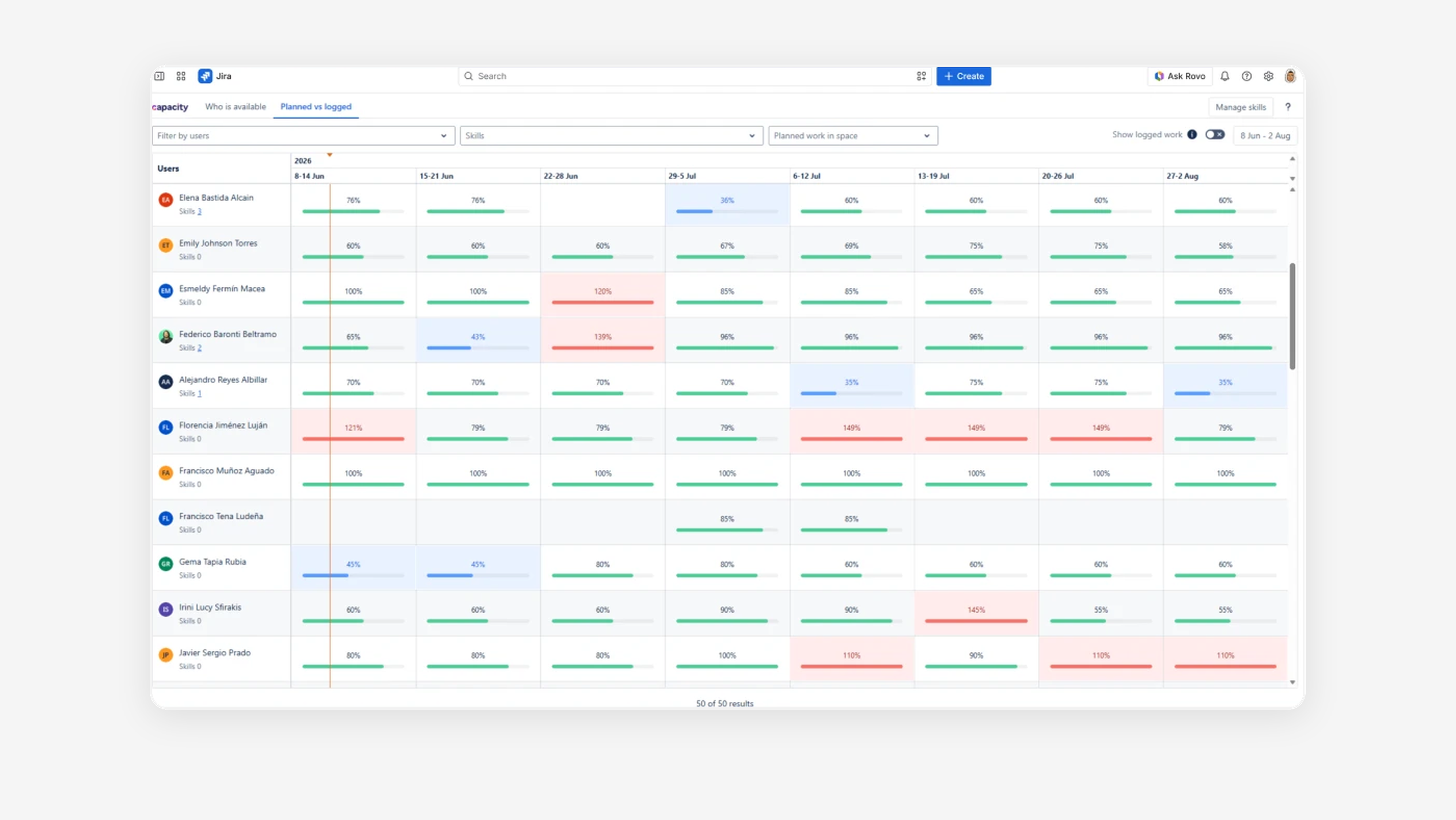
Resource Planning for Jira is a free resource allocation app by DS SOLUTION. Its Resource view shows who works on what, while the Project view shows who staffs each project, with weekly effort and totals in person-months.
Key features:
- Timeline and weekly heatmap views show allocations and capacity across teams.
- A dashboard highlights overloaded and underutilized people, plus those whose allocations end soon.
- Allocations can be created, moved, and split across the planning timeline.
- Non-Jira work, such as pre-sales, training, and support rotations, can be included in the plan.
- Multiple calendars account for different working days, hours, and regional holidays.
- External people and open positions can be planned without creating Jira accounts.
Trade-offs:
- Its documented focus is resource allocation; time tracking and dependency-based Gantt planning are not listed capabilities.
- Public adoption and review history are still limited.
- Available only for Jira Cloud.
Platforms: Jira Cloud.
Pricing: free up to 10 users, then $0.42 a user for 11–100, $0.30 for 101–250 and $0.12 for 251–1,000, with a free trial.
8. Resource Planning for Jira by DS Solution: the free option
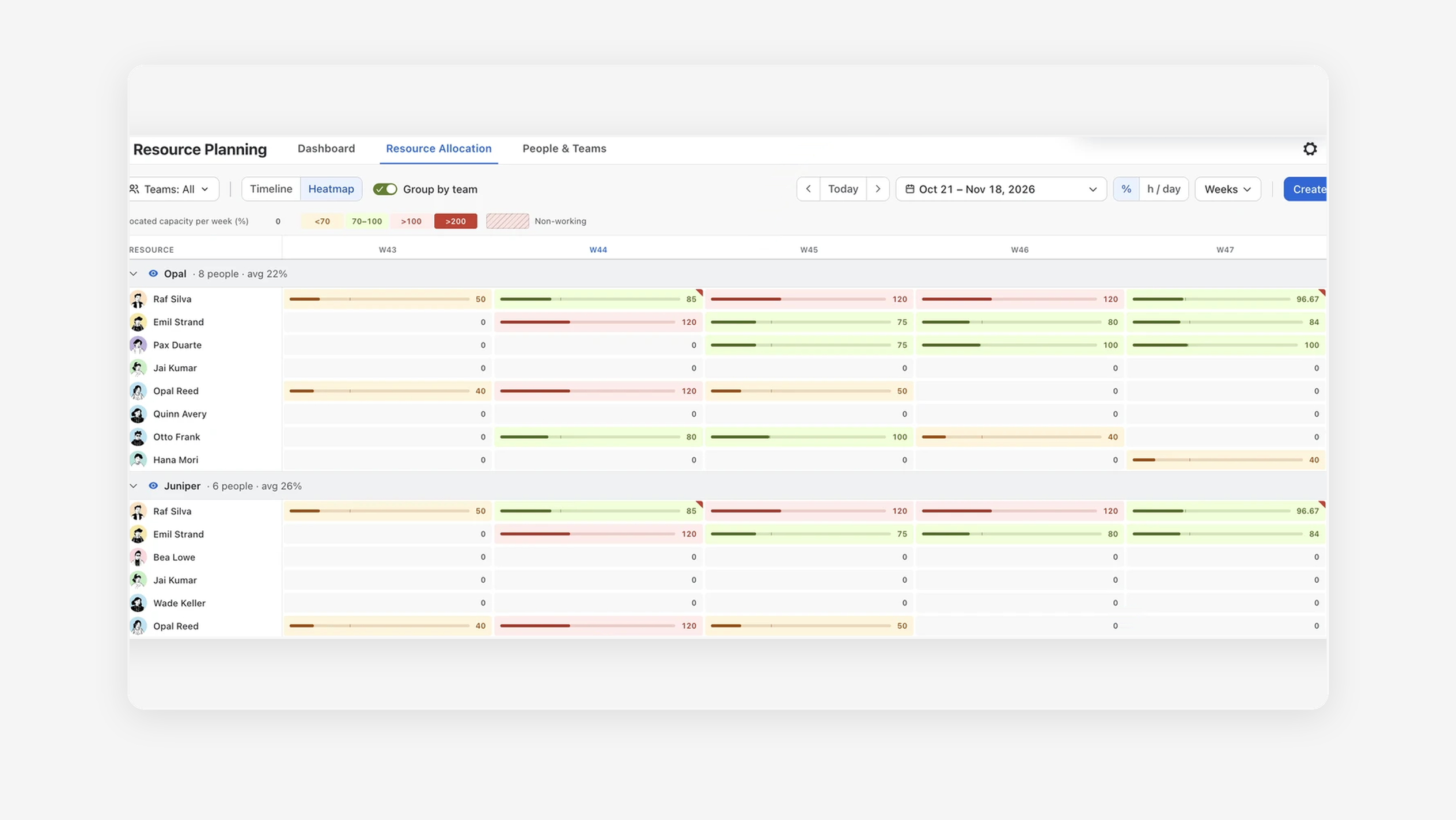
Resource Planning for Jira is a free resource allocation app by DS SOLUTION. It shows the same plan from two angles: Resource view shows each person’s assignments, while Project view shows who is allocated to each project, with weekly effort and totals in person-months.
Key features:
- Timeline and weekly heatmap views show allocations grouped by team.
- The dashboard highlights balanced, underutilized, and overloaded resources, and identifies people whose allocations end soon.
- Non-Jira work, including pre-sales, training, and support rotations, can be included in the plan.
- Separate calendars accommodate different working hours and regional holidays.
- External contractors and open positions can be planned without Jira accounts.
Trade-offs:
- Public adoption and review history are still limited.
- Its documented capabilities focus on allocations; built-in time tracking and dependency-based Gantt planning are not listed.
- Working calendars and allocations need to be maintained for reliable capacity visibility.
Platforms: Jira Cloud.
Pricing: free.
9. Workload & Capacity Planner: Team Heatmap by Simplify
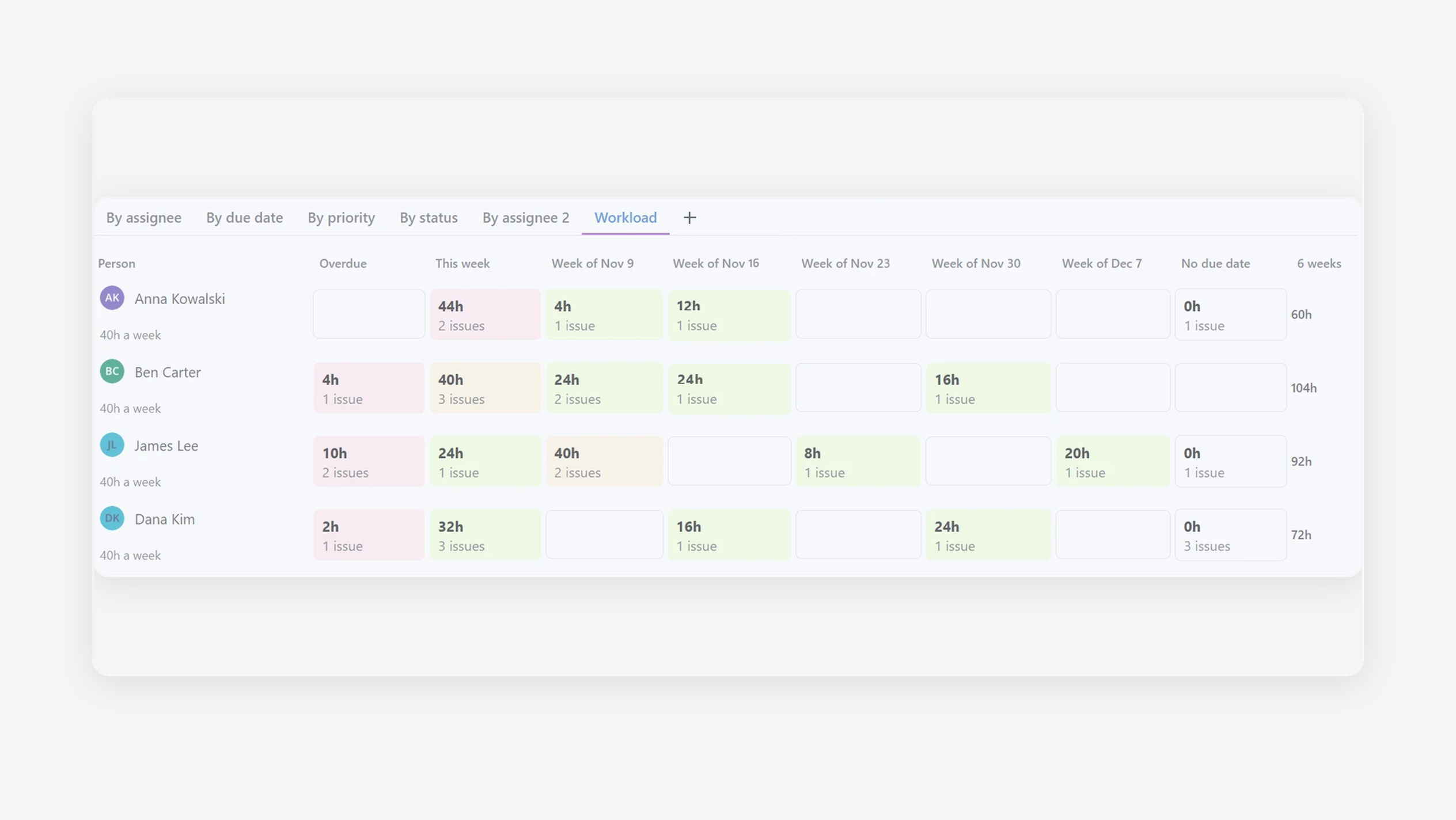
Team Heatmap is a lightweight workload checker for Jira Cloud. It compares estimated work due each week with each person’s weekly capacity, helping leads spot overload and redistribute tasks.
Key features:
- A weekly heatmap sums the remaining (or original) estimates of open issues by due date. Cells are green up to 80% of capacity, amber up to 100%, and red above.
- Each person’s weekly capacity can be set individually.
- An Assignee board lets managers drag issues between people to reassign them in Jira, including bulk moves and undo.
- Views can cover selected projects or Jira groups, be saved and shared, exported to CSV, or displayed as a dashboard gadget.
Trade-offs:
- Estimates are counted in the due-date week, rather than spread across a task’s duration.
- The app does not log time or track leave, so vacations do not automatically adjust capacity.
- The Sprints view requires Jira Software.
- No Marketplace reviews were listed at the time of checking.
Platforms: Jira Cloud.
Pricing: free up to 10 users, then $0.25 a user for 11–100, $0.20 for 101–250 and $0.15 for 251–1,000, with a free trial.
10. Float: resource scheduling outside Jira
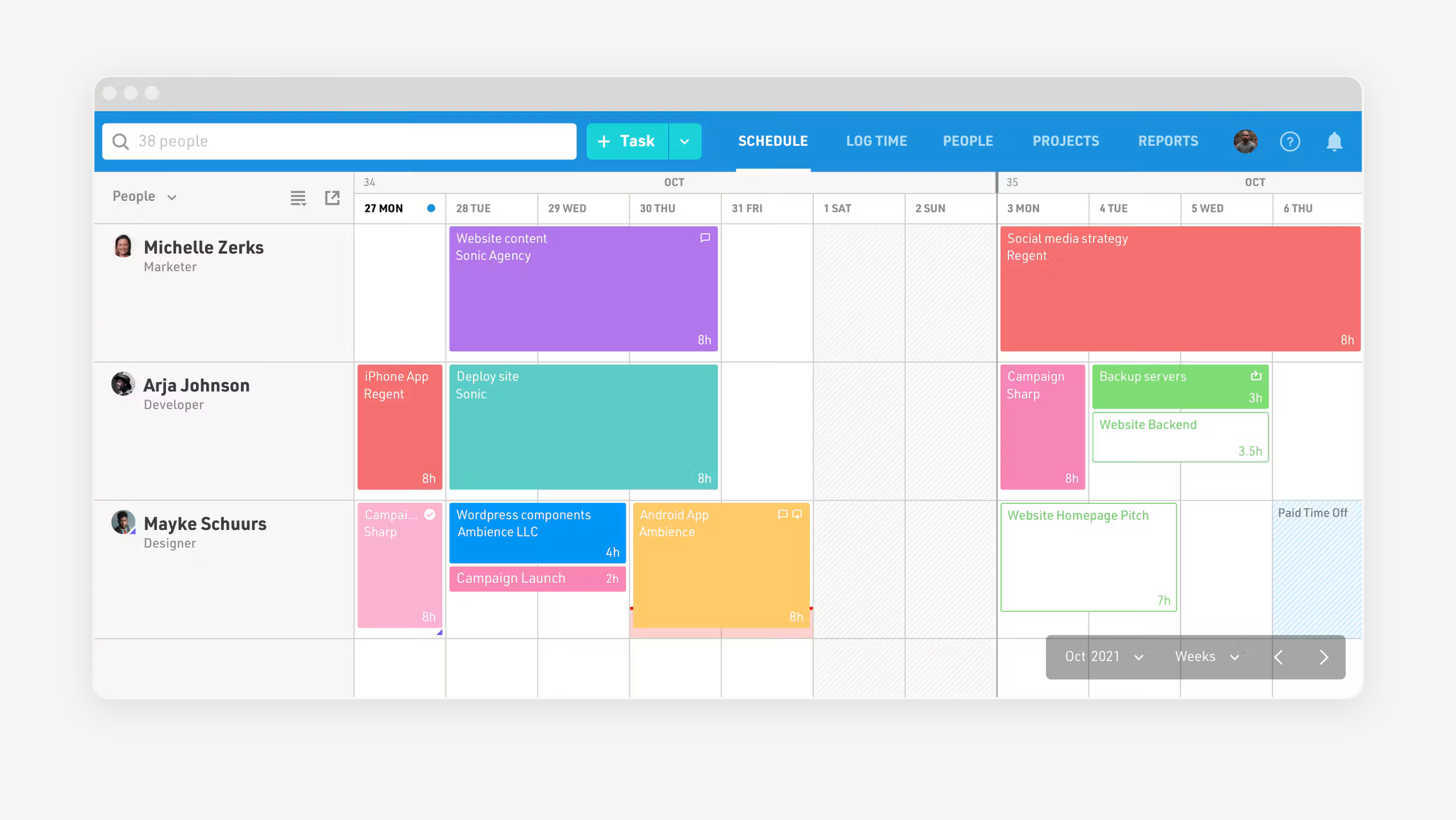
Float is a standalone resource management platform for teams coordinating people across projects. Its visual Schedule brings assignments and availability together, helping managers see who has room for more work and plan upcoming demand.
Key features:
- Drag-and-drop allocations schedule work in hours per day or percentages of capacity. Work can be moved, resized, split, or reassigned.
- Custom working days and hours, public holidays, and approved time off determine availability.
- Roles, departments, and skill tags help managers find suitable people for upcoming work.
- Tentative projects and role-based placeholders support planning before work or staffing is confirmed.
- Utilization reporting shows scheduled capacity, available hours, and overtime across people and teams.
Trade-offs:
- Planning happens in a separate system, so Jira teams need to configure and maintain the connection.
- Float recommends Zapier for new Jira integrations; its previous direct integration is now legacy. Some Zapier workflows require a paid plan.
- Time tracking and advanced reporting require Float’s Pro plan.
Platforms: Standalone cloud service; connects to Jira through integrations.
Pricing: Starter costs $7 per scheduled person/month and Pro $12, billed annually. Enterprise pricing is custom. Billing covers people added to the schedule rather than the entire Jira instance. A 30-day Pro trial is available without a credit card.
How to choose an app to manage resources in Jira
Ten apps is still too many to trial, so we’ve sketched this order. Many teams we talk to land on roughly the same order, whether they plan five people or five hundred.
Step 1: Write down the question you need answered
The account manager wants to know who is free next week. The CEO wants to know if they'll hit the March deadline. The CFO wants to know which of the 30 projects is eating everyone's time. Those are three different tools: a people planner, a schedule with capacity, and portfolio software.
Step 2: Test availability with your messiest person
Every number an app shows rests on what it thinks a person's week looks like. So in the trial, start with your hardest case.
Step 3: Check where the workload comes from: estimates, story points or custom fields
Most of these apps take workload from what's already on the task: an original estimate, a remaining estimate, story points or a number in custom fields. A team that never estimates will get an empty heatmap from all ten. Ask each vendor whether the app reads those numbers or asks you to keep a second set of allocations by hand.
Step 4: Price the whole stack at your user count
Atlassian bills an app for every user on your Jira site, not just the four people who will plan in it. Before you compare prices, also check that the features you need are in the plan you’re pricing: several of these apps keep budgets, skills or Gantt dependencies in a pricier Advanced edition.
Step 5: Settle Cloud vs Jira Data Center and check maturity
Four of the ten have no Data Center version, and Data Center itself is on a countdown. If you bought Data Center before March 30, 2026, you can keep renewing until March 30, 2028; on March 28, 2029 the product and every app on it go read-only. A team on Data Center today is better off with an app that also runs on Cloud, so the move doesn't wipe the plan.
Step 6: Run the trial on a real quarter
Then read each listing the way you'd read reviews for a hotel you're about to book for a week. Give each finalist the same real team and the same real quarter. It’s the only way to check whether the app can actually answer the questions you need it to answer.
Jira resource planning: where to start
If we had to squeeze Jira resource planning into one habit, it would be this: before anyone promises the client a date, somebody checks that the resources exist, and by resources we mean team members with actual free hours, not headcount on an org chart. Native Jira will carry you part of the way, as long as you're on Premium and don't mind typing weekly percentages into a grid. If you want capacity per person that moves when the work in Jira moves, with vacations and logged hours sitting right beside it, shop for an app, and the right one is whichever answers the question you get asked most.
Start on the free plan if your team is 10 people or fewer; bigger teams get every feature in the trial. Start exploring on your real Jira site with two or three people: give them their working hours and their time off, then open next week. That's enough to see whether a red bar is already waiting there.


FAQ
Jira provides a starting point for resource management through assignees, estimates, and dates. These fields support task tracking, but planning resources also means knowing whether people have time to complete tasks. Anna’s four-day week, vacation, and commitments to other projects all affect her availability. Teams often add a Marketplace app or maintain a spreadsheet alongside Jira to bring that information into their capacity management and workload management.
Jira Plans, formerly Advanced Roadmaps, supports team capacity planning on Premium and Enterprise. Jira’s separate Capacity view supports weekly allocations for individuals. These native options help coordinate multiple teams, but teams that need availability based on individual schedules, holidays, and time off may need an app. Planyway, ActivityTimeline, and Portfolio by HeroCoders add ways to review the team’s workload and assess whether future projects fit alongside existing commitments.
Jira connects with tools such as Confluence, Slack, Microsoft Teams, GitHub, Bitbucket, and Google Sheets through built-in connections, Marketplace apps, or automation services. For resource planning, integrations can bring together project demand, calendars, and human resources data. Apps that work directly with Jira issues can also keep cross project plans connected to the work teams update every day, reducing manual transfers.
Planyway for Jira, Tempo’s Capacity Planner, ActivityTimeline, and ProScheduler are established Marketplace options for resource and project planning. Their focus varies: some emphasize portfolio planning, while others concentrate on staffing and availability. Installation counts and reviews provide useful context, but your trial should test how well the app handles assigning work, tracking tasks, and balancing capacity across your projects.
The best resource management software for a Jira team depends on the unique needs of each team. If you need capacity planning, roadmaps, time tracking, and reporting across several projects in one app, you can check out Planyway. A PMO managing a large portfolio may prefer BigPicture, an existing Tempo customer may choose Capacity Planner, and a team with no budget can try Resource Planning for Jira by DS SOLUTION. Just remember, to boost productivity, choose the tool that makes planning easier to maintain as priorities change.